OpenBao alternative for app secrets: Dopbase vs OpenBao
Looking for an OpenBao alternative? We ran OpenBao 2.7.3 and Dopbase side by side: setup, unsealing after a restart, app secrets, and who each one fits.
If you need an OpenBao alternative for app secrets (API keys and database URLs that a process reads at startup), Dopbase does that job with four commands and no config file. If you need short-lived database credentials, certificates or a cluster that survives a node failing, OpenBao is built for that.
The most useful thing the test showed is how much of the OpenBao setup advice online no longer runs. We started from a Vault-style config with storage "file", the backend most tutorials use, and OpenBao 2.7.3 refused to start: unknown storage type file. Version 2.7.0 removed that backend. The next config pointed PebbleDB, its replacement for one node, at a Docker volume on /openbao/data, and that failed with permission denied, because the official image only hands a few fixed folders to the openbao user. Neither problem is in the pages that rank for OpenBao today.
We ran both tools on the same two-line app with one sample secret (OpenBao 2.7.3 from the official Docker image, Dopbase 0.2.0, Docker 29.8.2, macOS 27.2.1, 23 November 2026). The table counts what it takes to get one value into a running process and what each tool needs after a restart. OpenBao’s facts were checked against openbao.org on the same day. The commands are for macOS and Linux. We ran one node of each, so clustering and high availability weren’t tested.
Contents
- Dopbase vs OpenBao at a glance
- What OpenBao is
- Setting up Dopbase
- Setting up OpenBao 2.7.3
- Restarting OpenBao: the Shamir seal and the static seal
- Getting one secret into your app
- Giving an AI coding agent the names, not the values
- Is Dopbase a good OpenBao alternative for you?
- Run the test yourself
- Questions
- Conclusion
Dopbase vs OpenBao at a glance
| Dopbase 0.2.0 | OpenBao 2.7.3 | |
|---|---|---|
| What it is | Secrets manager for developers and AI coding agents | Fork of HashiCorp Vault, run by the Linux Foundation’s OpenSSF |
| License | Apache 2.0 | MPL-2.0 |
| How you run it | One executable with SQLite | bao server with a config file and a storage backend |
| Steps to one secret in a running app | 4 commands, 0 config files | 13 steps, 2 config files (Shamir seal) |
| After a restart | Nothing | 3 of 5 unseal keys (Shamir), or nothing with the static seal |
| Where the encryption key lives | master.key file on the server |
Split into unseal keys (Shamir), or a key file (static seal) |
| How a secret reaches the app | dopbase run project/env -- cmd |
OpenBao Agent with env_template and exec (public beta) |
| Web UI | Built in | Built in, off until ui = true |
| Names only access for an AI agent | A preset level for tokens and agent accounts | A policy you write by hand |
What OpenBao is
OpenBao’s homepage calls it “an open source, community-driven secrets manager and fork of Vault managed by the Linux Foundation’s OpenSSF.” It was forked from the last MPL-licensed Vault code, a few commits after Vault 1.14.8. That’s why the CLI, the API and most of the docs still look like Vault’s. OpenBao is licensed under MPL-2.0.
It has moved on since the fork. Version 2.7.0 removed the file storage backend and moved many auto-unseal options out of the binary and into plugins. Anything written before that release, including most tutorials, may not run as written on 2.7.3.
Setting up Dopbase
Dopbase is a secrets manager for developers and AI coding agents. It keeps values by project and environment on a server, and dopbase run hands one environment to one command as environment variables. The server is a single executable with a SQLite database and a built-in Admin UI.
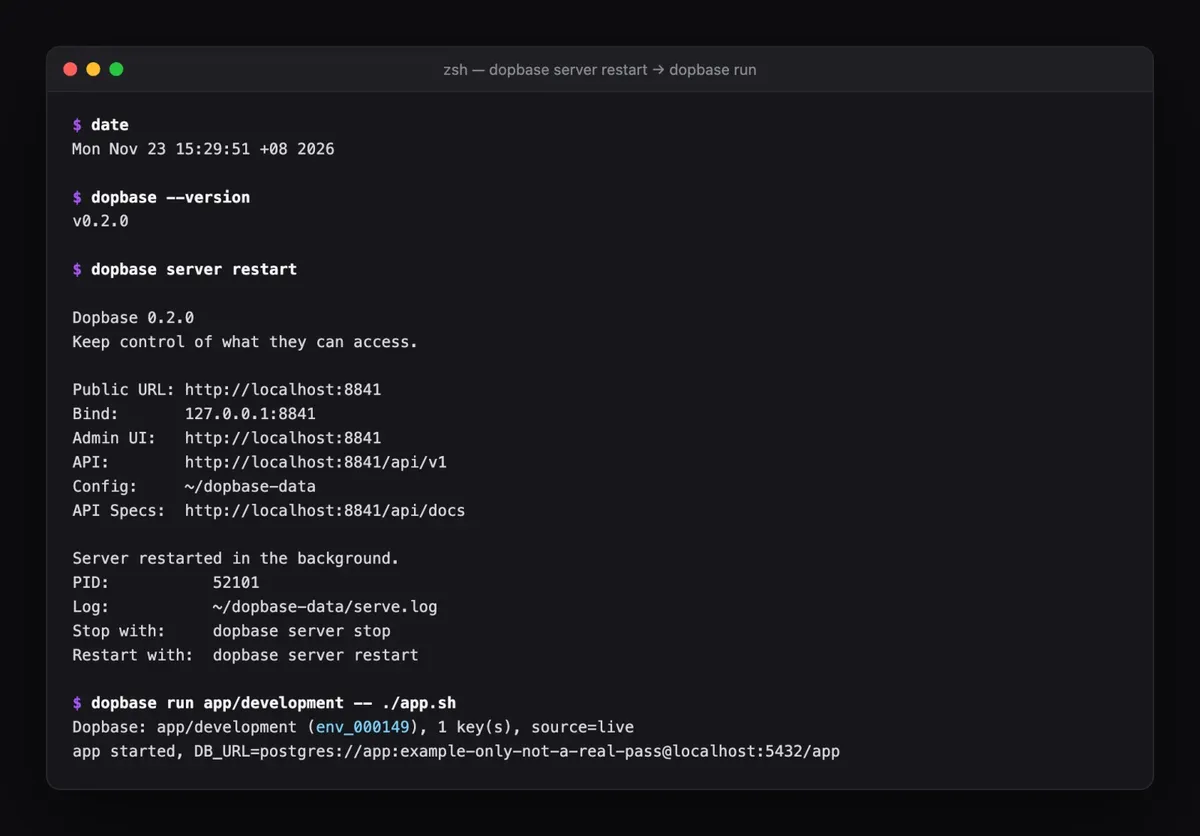
From an installed binary, four commands got our sample value into the app:
DOPBASE_ROOT_EMAIL=you@example.com dopbase server start --background
dopbase login
dopbase init app/development --from .env
dopbase run app/development -- ./app.sh
Dopbase: app/development (env_000149), 1 key(s), source=live
app started, DB_URL=postgres://app:example-only-not-a-real-pass@localhost:5432/appWe restarted the server twice and ran the app after each restart. Both runs printed the same two lines, with nothing to unseal in between.
Setting up OpenBao 2.7.3
Dev mode is one command, and it’s fast: bao server -dev starts unsealed, with a secret/ engine mounted. The log says why it isn’t the comparison: “OpenBao runs entirely in-memory”. We wrote the sample value, restarted the container and got No value found at secret/data/app. OpenBao’s dev server page says the same, “Never, ever, ever run a “dev” mode server in production”.
So we needed a config file and storage. The first try was a config in the style the ranking tutorials use, with storage "file":
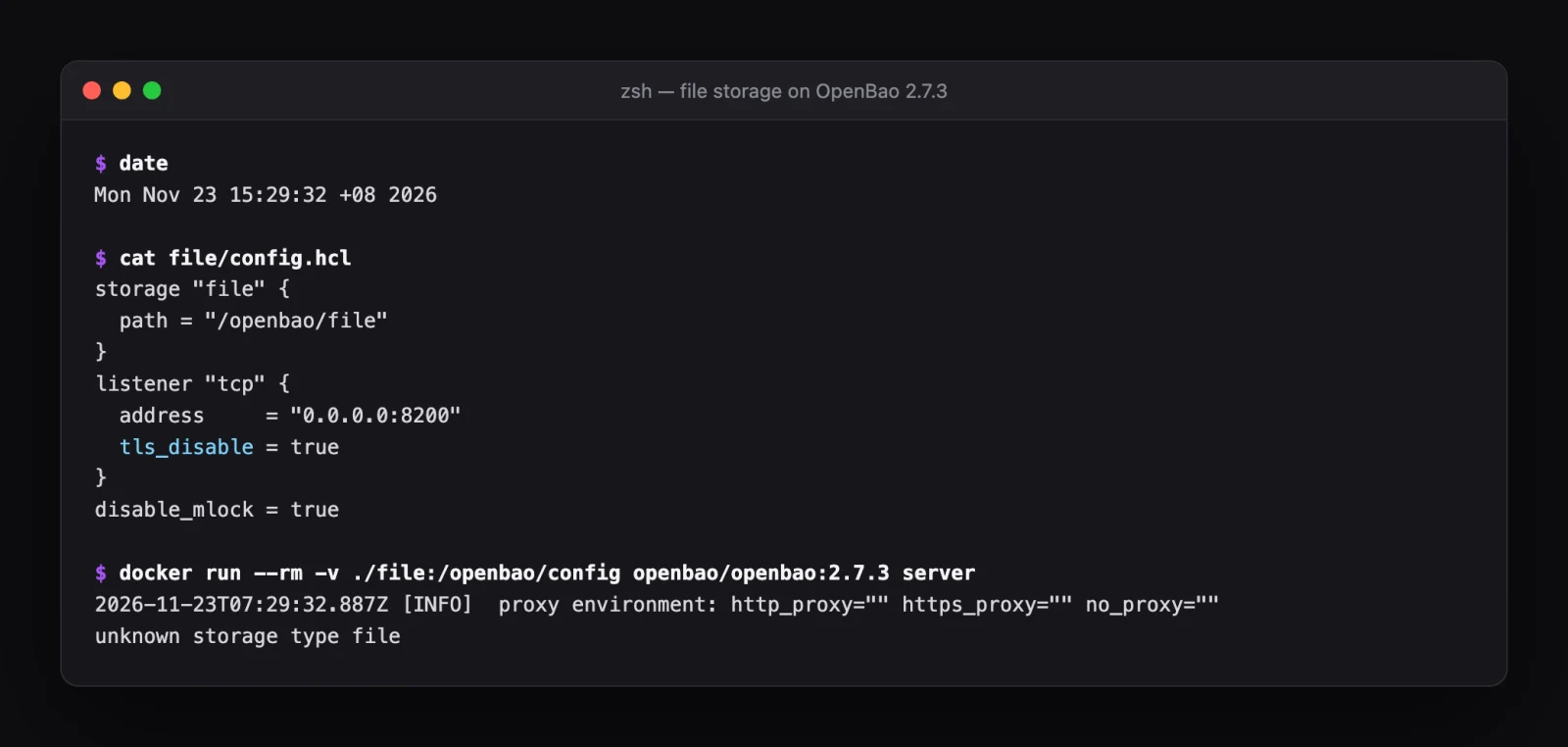
OpenBao’s changelog for 2.7.0 says it plainly: “Remove file storage backend support.” The storage docs recommend PostgreSQL to new operators as “an easier storage backend to safely operate than Raft.” This test is one node, so we used PebbleDB. It needs no second service, and it has no high availability.
The PebbleDB path cost another run. With the data on a Docker volume at /openbao/data, the container exited with open /openbao/data/LOCK: permission denied, twice. The image’s entrypoint changes the owner of /openbao/config, /openbao/logs and /openbao/file to the openbao user, and of nothing else. Moving the volume to /openbao/file fixed it. (The folder is still named after the backend 2.7.0 removed.)
This is the config that worked:
storage "pebbledb" {
  path = "/openbao/file"
}
listener "tcp" {
  address     = "0.0.0.0:8200"
  tls_disable = true
}
ui            = true
disable_mlock = true
bao operator init printed 5 unseal keys and a root token, and three bao operator unseal calls took the server from Sealed true to Sealed false. The first kv put then failed with 403 ... preflight capability check returned 403, even as root, because a real server has no secret/ engine until you enable one with bao secrets enable -path=secret kv-v2. After that, the write and the read worked. With ui = true set, /ui/ answered too. The docs say the UI “is not activated by default.”
Restarting OpenBao: the Shamir seal and the static seal
By default OpenBao splits the key that decrypts its data into 5 shares and needs 3 of them, and it starts sealed every time. We restarted the container:
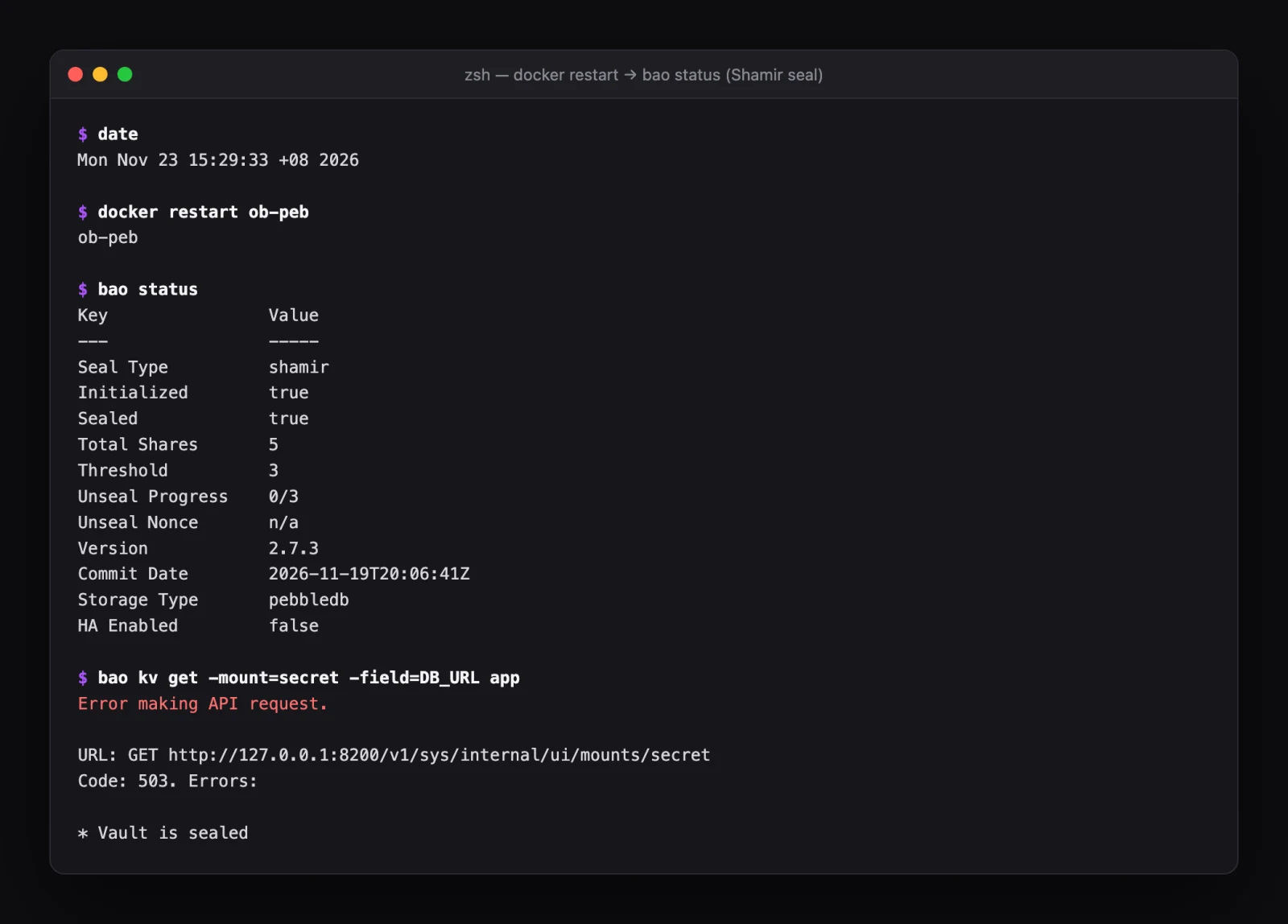
Until three key holders unseal it, the app gets nothing. (The 503 error still says “Vault is sealed”.)
OpenBao has a built-in way around that, the static key seal. You give it a 32-byte key in a file, and it unseals itself on start:
seal "static" {
  current_key_id = "20261123-1"
  current_key    = "file:///openbao/keys/unseal.key"
}
Our first key file came from openssl rand -hex 32 > unseal.key, and the server refused it: unknown encoding for AES-256 key: must be either a raw, hex, or base64-encoded. The trailing newline made it 65 bytes. Writing it with tr -d '\n' fixed that. operator init then printed 5 recovery keys instead of unseal keys, and the server came up unsealed on its own. We restarted it twice:
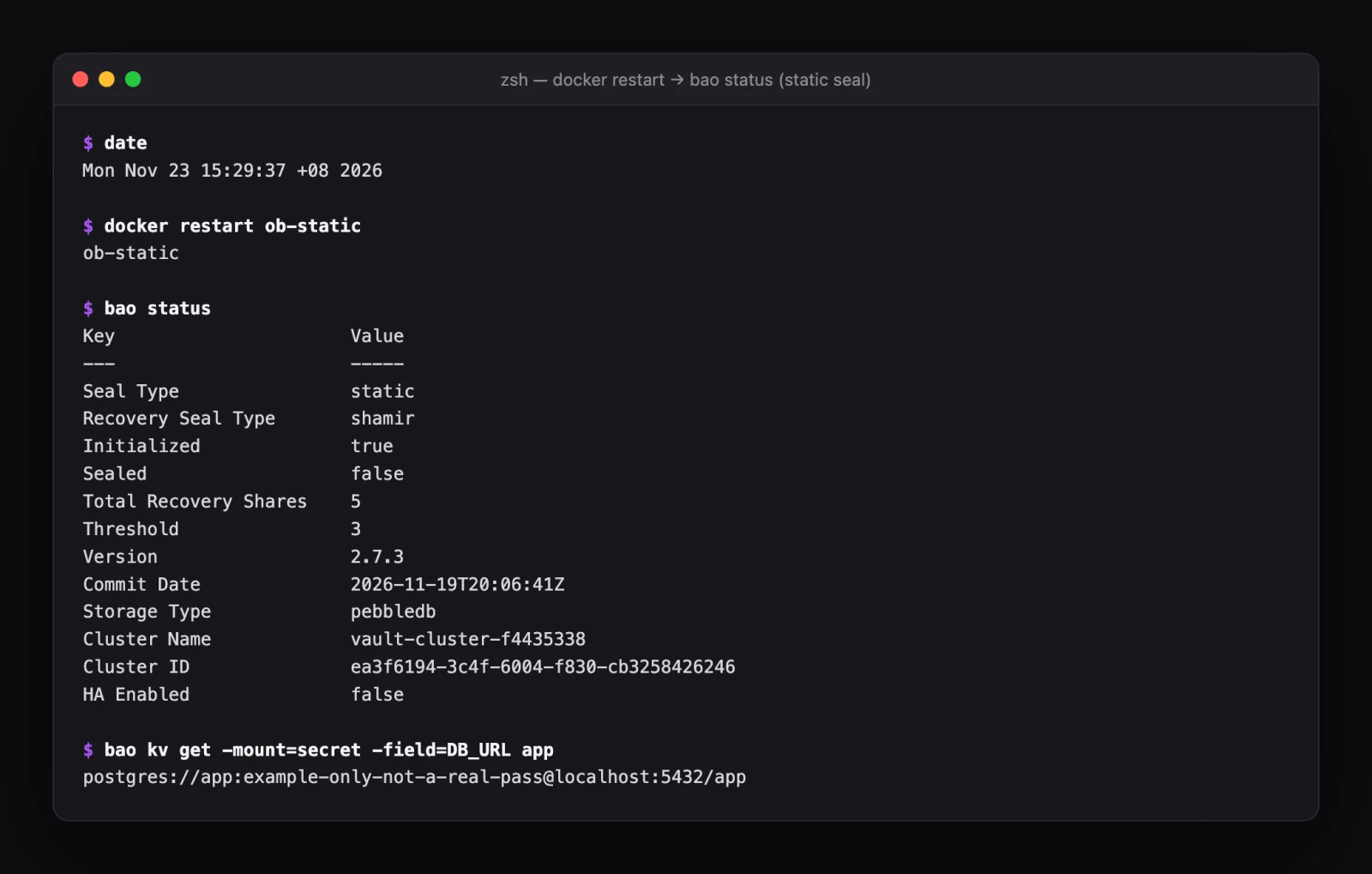
That works like Dopbase’s master.key: a key file next to the server, and no unseal step. OpenBao’s docs add a caution about this seal, recommending it “only when an existing source of trust, such as another third-party secrets manager, already exists in the operating environment”.
Getting one secret into your app
Dopbase does it in one command, shown above: dopbase run app/development -- ./app.sh.
OpenBao does it with OpenBao Agent in process supervisor mode, which the docs mark as public beta. The Agent “will inject secrets referenced in the env_template configuration blocks as environment variables into the child process specified in the exec block.” bao agent generate-config writes the file for you:
bao agent generate-config -type=env-template \
  -exec="/openbao/config/app.sh" -path="secret/app" agent.hcl
It warned that the token_file login it chose is “not suitable for production environments”. The first run looped on error reading token file and no cached token known: open /home/openbao/.vault-token: no such file or directory, so we wrote a token there. The next two runs both printed app started, DB_URL= with an empty value. The generated config names the variable after the path and the key, APP_DB_URL, and our app reads DB_URL. Renaming the block to env_template "DB_URL" fixed it. Vault’s Agent does the same, so check the names before you blame the token.
Counted from a pulled image, the Shamir setup took 13 steps and 2 config files. Those are the server config, starting it, init, 3 unseals, the token, the engine, kv put, the Agent config, the renamed variable, the token file and the Agent itself. The static seal adds a key file and drops the 3 unseals.
Giving an AI coding agent the names, not the values
An agent that writes code needs to know which variables exist, not what they hold. Our guide to keeping .env secrets away from AI coding agents covers why.
In Dopbase, Names only is a level you pick. We added an AI agent account in the Admin UI, gave it Names only on the app project and made a token. (The level picker and the token dialog both start on Read, so pick Names only twice.) With that token in DOPBASE_TOKEN, the agent could list secrets but not read them or run with them:
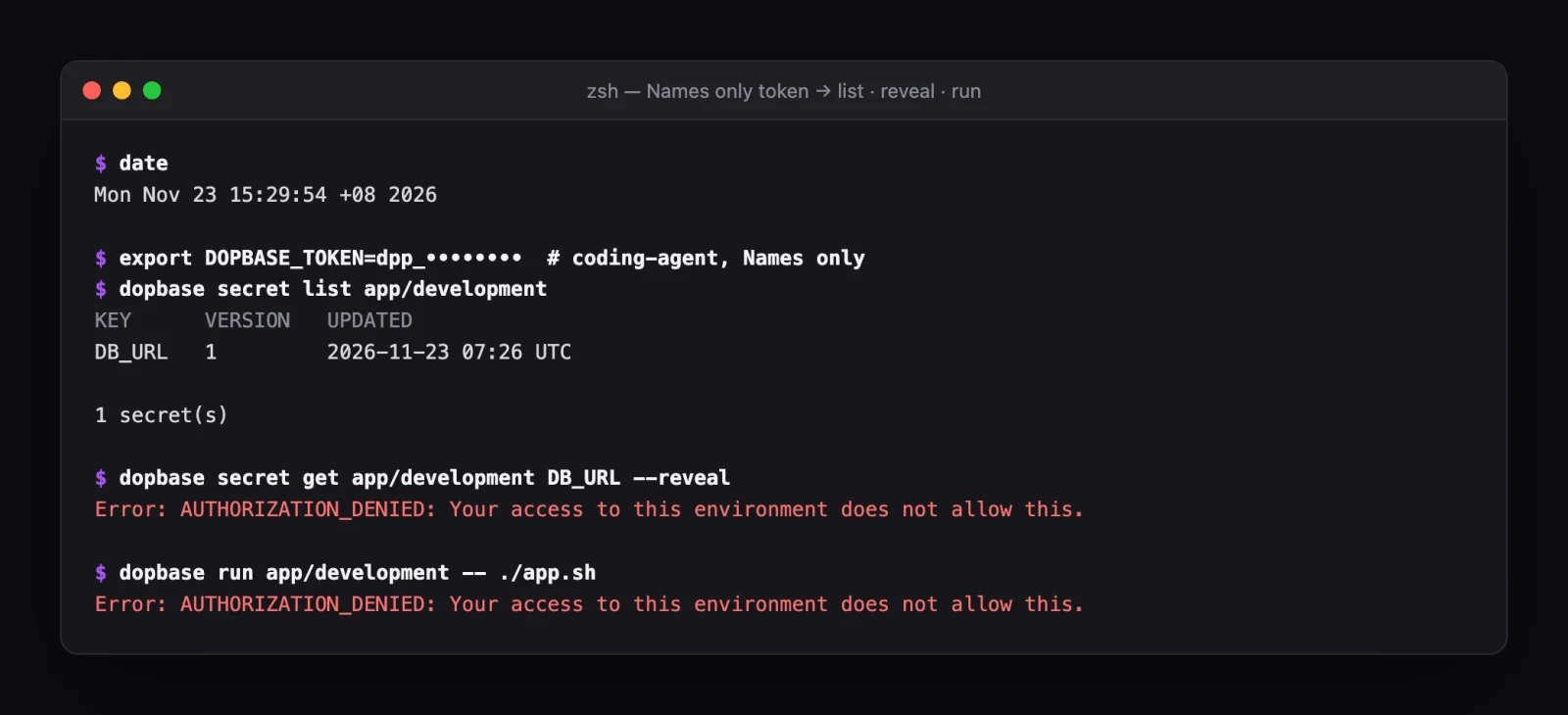
OpenBao can do the same with a policy you write:
path "secret/metadata/*" {
  capabilities = ["list"]
}
path "secret/subkeys/*" {
  capabilities = ["read"]
}
A token with that policy listed app, bao read secret/subkeys/app showed subkeys map[DB_URL:<nil>], and kv get failed with permission denied. It works, but you need to know that KV v2 keeps names under two separate API paths. People also search for an OpenBao MCP server. We found no official one on 23 November, only demos from third parties.
Is Dopbase a good OpenBao alternative for you?
Pick Dopbase if:
- Your secrets are static values that apps and scripts read when they start.
- One server is enough, and you’d rather not run unseal keys or a storage cluster.
- You want projects and environments, a web UI and
dopbase runfrom day one. - AI coding agents work in your repositories and should see names only. Our roundup of self-hosted secrets managers explains how Dopbase is built.
Pick OpenBao if:
- You need dynamic credentials, certificates or encryption as a service.
- You need more than one node, or tenants on one server.
- You already know Vault, and you want its API under an open source license.
If you’re still choosing between more tools, our list of secrets management tools compares the wider field.
Run the test yourself
You need Docker. This block starts OpenBao 2.7.3 with the Shamir seal, unseals it, restarts it and prints the status:
date
mkdir -p ~/openbao-test/keys && cd ~/openbao-test
bao() { docker exec -i -e BAO_ADDR=http://127.0.0.1:8200 bao-test bao "$@"; }

cat > config.hcl <<'EOF'
storage "pebbledb" {
  path = "/openbao/file"
}
listener "tcp" {
  address     = "0.0.0.0:8200"
  tls_disable = true
}
disable_mlock = true
EOF

docker run -d --name bao-test -p 8200:8200 \
  -v "$PWD/config.hcl:/openbao/config/config.hcl" openbao/openbao:2.7.3 server
sleep 3
bao operator init > init.txt
for i in 1 2 3; do bao operator unseal "$(grep "Unseal Key $i:" init.txt | awk '{print $4}')"; done
docker restart bao-test && sleep 3
bao status
The last command prints Sealed true and Unseal Progress 0/3. This one does the same with the static seal:
cd ~/openbao-test
openssl rand -hex 32 | tr -d '\n' > keys/unseal.key
cat > static.hcl <<'EOF'
storage "pebbledb" {
  path = "/openbao/file"
}
listener "tcp" {
  address     = "0.0.0.0:8200"
  tls_disable = true
}
seal "static" {
  current_key_id = "test-1"
  current_key    = "file:///openbao/keys/unseal.key"
}
disable_mlock = true
EOF

docker run -d --name bao-static -p 8201:8200 \
  -v "$PWD/static.hcl:/openbao/config/config.hcl" \
  -v "$PWD/keys:/openbao/keys" openbao/openbao:2.7.3 server
sleep 3
docker exec -e BAO_ADDR=http://127.0.0.1:8200 bao-static bao operator init > static-init.txt
docker restart bao-static && sleep 3
docker exec -e BAO_ADDR=http://127.0.0.1:8200 bao-static bao status
It prints Seal Type static and Sealed false. Remove both with docker rm -f bao-test bao-static, and delete ~/openbao-test (it holds the root tokens).
For Dopbase, on a machine with no Dopbase server yet:
date
dopbase --version
mkdir -p ~/dopbase-test && cd ~/dopbase-test
printf 'DB_URL=postgres://app:example-only-not-a-real-pass@localhost:5432/app\n' > .env
printf '#!/bin/sh\necho "app started, DB_URL=$DB_URL"\n' > app.sh && chmod +x app.sh
DOPBASE_ROOT_EMAIL=you@example.com dopbase server start --background
dopbase login
dopbase init app/development --from .env
dopbase run app/development -- ./app.sh
dopbase server restart
dopbase run app/development -- ./app.sh
server start prints the root password once, and login asks for it. Both run lines print the sample value.
Questions
What is OpenBao?
OpenBao is an open source secrets manager and a fork of HashiCorp Vault, run by the Linux Foundation’s OpenSSF under the MPL-2.0 license. It stores secrets, generates short-lived credentials, issues certificates and encrypts data for other services. Its CLI is bao, and its API follows Vault’s.
Does OpenBao have a UI?
Yes. The web UI is off by default, and you turn it on with ui = true in the server config. It runs on the same port as the API, at /ui/.
Is OpenBao free?
Yes. OpenBao is open source under MPL-2.0 and costs nothing to run. You host it, back it up and keep the unseal keys yourself.
Does OpenBao need to be unsealed after a restart?
With the default Shamir seal, yes: it starts sealed and needs 3 of the 5 unseal keys. With auto-unseal (the built-in static key seal, or a KMS or HSM plugin), it unseals itself on start.
Is there an OpenBao MCP server?
We found no official one on 23 November 2026, only demos built by third parties. An agent can still use the bao CLI or the API with a token whose policy limits what it reads.
Conclusion
For app secrets on one server, Dopbase took 4 commands and needed nothing after a restart. OpenBao 2.7.3 took 13 steps and 3 unseal keys after every restart, or a key file with the static seal.
I’d run Dopbase for static values that apps and AI coding agents need, and OpenBao when a service needs credentials that expire on their own. If you pick OpenBao, I wouldn’t copy a config from a tutorial without checking its date against 2.7.0. We didn’t test Raft, PostgreSQL storage, clustering or any auto-unseal plugin.
docker run --rm openbao/openbao:2.7.3 bao version