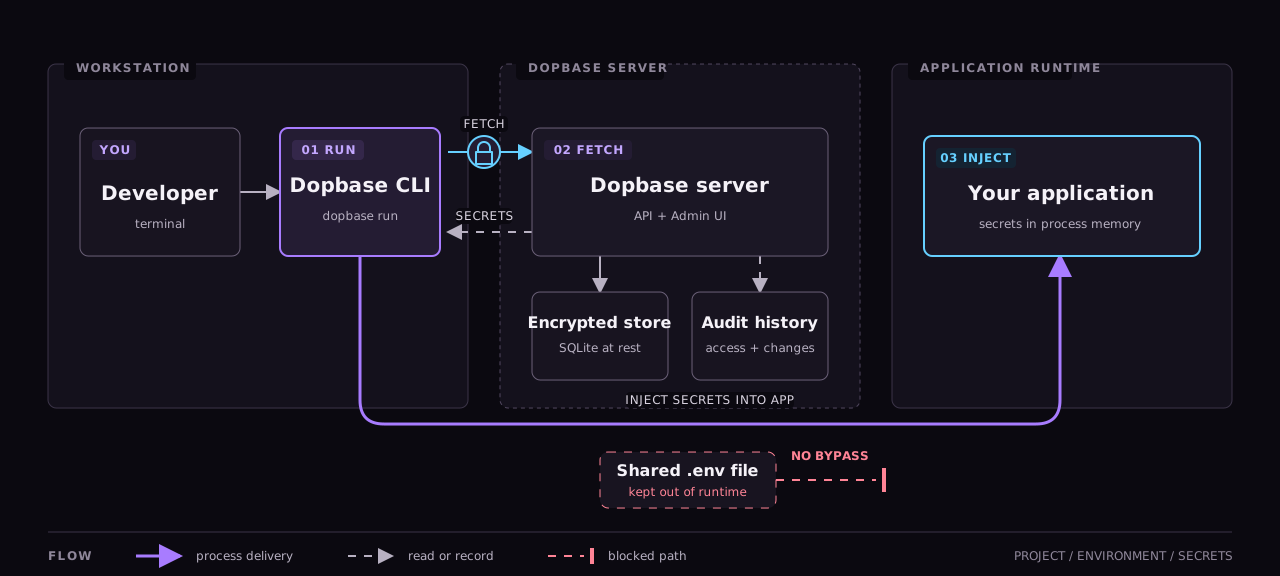
How Dopbase works for developer, machines, and AI agents
Dopbase is a self-hosted, open-source secrets manager. Developers
manage application secrets, machines load one environment at runtime,
and AI agents can inspect project structure without seeing secret
values.
When the server is available, the CLI authenticates, retrieves one
environment, and starts your application with those values in process
memory. It does not write a shared .env file.
Swipe to view the full diagram.
The server stores encrypted values and audit history. The CLI delivers
the selected environment to the child process without creating a shared
environment file.
Access by identity
Choose the identity that matches the job
A teammate, a deployment, and a coding agent should not share the same
credential or permissions.
Human
Dev team manage secrets
Use the Admin UI for day-to-day editing or sign in through the CLI
for terminal work. Human accounts can create projects, separate
environments, update secrets, and create runner tokens.
Root and admin accounts can also manage human users and AI accounts.
Typical access
Manage projects, environments, secrets, and runner tokens.
Machine
Machines run applications
CI jobs, servers, containers, and deployment tools use a runner
token tied to one environment. dopbase run loads that environment
and starts the application with the values in memory.
export DOPBASE_TOKEN=<runner-token>
dopbase run env_01ABCDEF -- ./payment-service
Restricted to
One environment. It cannot change or export secrets.
AI agent
Agents read structure, not values
Give a coding agent a named service account when it needs to
understand the project setup. It can read projects, environments,
secret names, versions, and timestamps.
It cannot retrieve secret values, change data, list runner tokens,
or read audit history.
Metadata only
Secret values stay outside the agent's access.
Run it yourself
Set up Dopbase on your own infrastructure.
One executable contains the server, Admin UI, REST API, migrations, and
command-line client.