HashiCorp Vault alternative: Dopbase vs Vault, tested
Looking for a HashiCorp Vault alternative? We set up Vault 2.2.2 and Dopbase side by side: unsealing, getting a secret into an app, and who each fits.
You wanted your app’s secrets out of a .env file, and someone said “use HashiCorp Vault”. A few steps later you have a config file, five unseal keys, a root token, and an app that still prints an empty DB_URL. If that sounds familiar, you’re probably asking whether a simpler HashiCorp Vault alternative would do the job. For app secrets on a small team, it usually will. Dopbase got a secret into our test app in four commands and kept working after a restart. Vault is still the right pick when you need dynamic credentials, certificates or a cluster, and the last section shows where that line sits.
I’ll set up both tools with you on the same one-line app and the same sample value. You’ll see what each asks on day one, what happens when the server restarts, how each hands the value to your app, and how each shows an AI coding agent the names without the values.
We ran everything on 23 November 2026 on macOS 27.2.1 (Apple silicon), with Dopbase v0.2.0 and Vault v2.2.2 from the official hashicorp/vault Docker image. The commands are for macOS and Linux, and Vault’s facts come from HashiCorp’s docs and license file, read the same day. We didn’t test Vault Enterprise, HCP Vault Dedicated, auto-unseal or a multi-node cluster.
Contents
- Dopbase vs Vault at a glance
- What you need
- Set up Dopbase and run the app
- Set up Vault: dev mode first
- Set up a Vault server that keeps its data
- Get the secret into your app with Vault Agent
- Give an AI coding agent names, not values
- Is HashiCorp Vault free and open source?
- Is Dopbase a good HashiCorp Vault alternative for you?
- Run the test yourself
- Questions
- Conclusion
Dopbase vs Vault at a glance
| Dopbase v0.2.0 | Vault v2.2.2 (Community) | |
|---|---|---|
| What it is | A secrets manager for developers and AI coding agents | A secrets server with static and dynamic secrets, PKI and more |
| License | Apache 2.0 | Business Source License 1.1 |
| What you run | One binary with SQLite and a built-in Admin UI | A server plus a storage backend you configure |
| Commands to a running app (our test) | 4, no config files | 12, plus 2 config files |
| After a restart | Serves right away | Sealed until 3 of 5 unseal keys are entered |
| How the app gets the value | dopbase run app/development -- ./app.sh |
Vault Agent with an env_template and exec block, or the API |
| Secret names only, for an AI agent | Built-in Names only level | A policy you write by hand |
The counts come from the runs below. We counted the Vault server you’d keep, not dev mode.
What you need
Dopbase needs one line to install on macOS or Linux:
curl -fsSL https://dopbase.com/install.sh | shVault needs more before it can hold a secret. We ran it in Docker (29.8.2), so you need Docker installed, then the hashicorp/vault image, then a config file you write, then the init and unseal steps. Here’s what each one asked of us before the app got its first secret:
| Dopbase | Vault | |
|---|---|---|
| Install | One curl line |
Docker, the Vault image, a config file |
| Config files you write | 0 | 2 (vault.hcl, agent.hcl) |
| Commands to a running app | 4 | 12 |
| What you keep safe after setup | One admin password, and a master key file Dopbase creates | 5 unseal keys and a root token |
| After every restart | Nothing | Enter 3 unseal keys |
| Time for a first setup (our estimate) | About 5 minutes | 30 minutes or more if Vault is new to you |
The times are a rough estimate for someone doing it for the first time, not a stopwatch result. The counts come from our run.
Both setups use the same folder with two files: a .env with one sample value, and a tiny app that prints it.
cat > .env <<'EOF'
DB_URL=postgres://app:example-only-not-a-real-pass@localhost:5432/app
EOF
printf '#!/bin/sh\necho "app started, DB_URL=$DB_URL"\n' > app.sh && chmod +x app.sh
Set up Dopbase and run the app
Dopbase is a secrets manager for developers and AI coding agents. It keeps values on a server, grouped by project and environment, and dopbase run hands one environment to one command as environment variables. Those three ideas are the whole model, and why Dopbase keeps the model small explains where it stops.
Start the server and log in. DOPBASE_ROOT_EMAIL creates the first admin account and prints its password once, so copy it. Without it, Dopbase prints a setup link for the browser.
DOPBASE_ROOT_EMAIL=admin@example.com dopbase server start --background
dopbase login
Then import the .env file into a project app with an environment development, and start the app with it.
dopbase init app/development --from .env
dopbase run app/development -- ./app.sh
You should see:
Initialized app/development.
Project ID:      prj_01M83H59YJSCC2J338ZBTEXDWM
Environment ID:  env_289002
Secrets:         1

Dopbase: app/development (env_289002), 1 key(s), source=live
app started, DB_URL=postgres://app:example-only-not-a-real-pass@localhost:5432/app
That’s four commands and no config file. Once the import works you can delete .env. Now restart the server and run the app again.
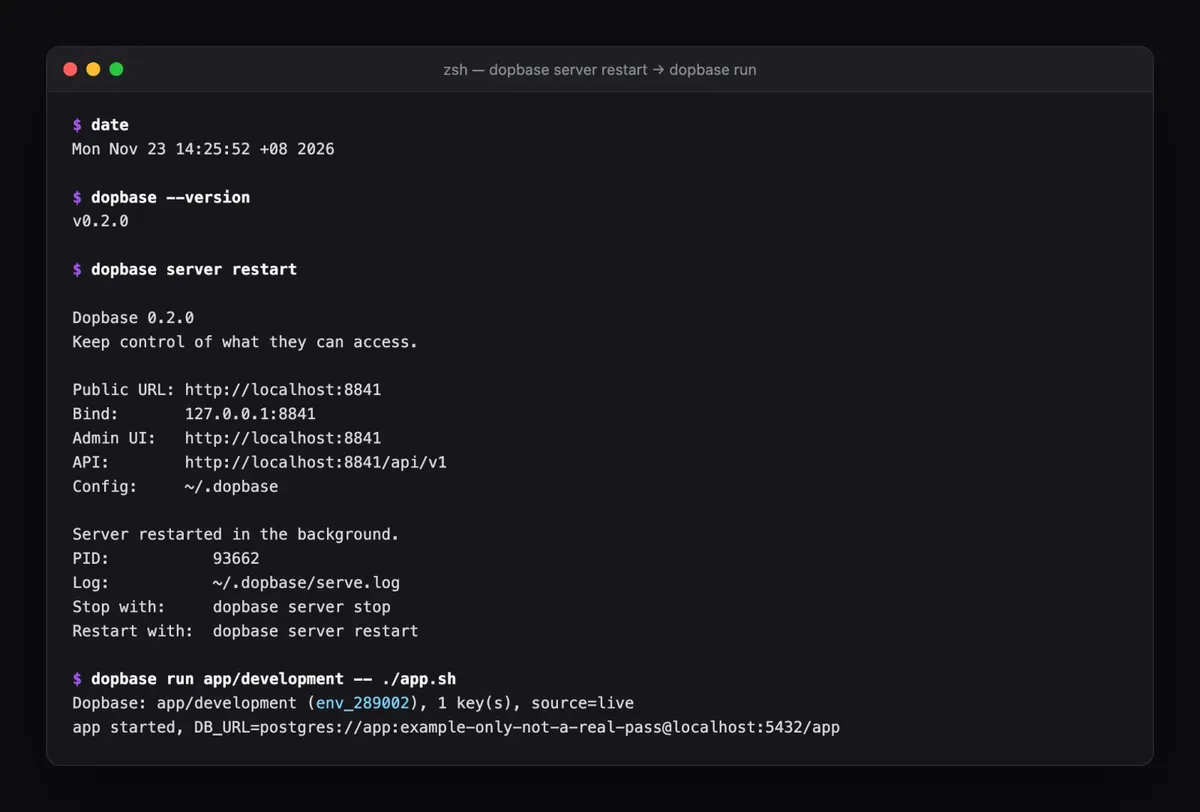
The app got its value straight after the restart, with no extra step. Before this shot we had already restarted once and run the app twice, with the same line both times. (Our test server ran on port 8841 so it wouldn’t touch another instance. Yours will say 8840.)
Dopbase reads its master key from a file when it starts, which is why there’s nothing to type. My tip before you store real secrets: move master.key to its own protected location, as the encryption keys docs describe.
Set up Vault: dev mode first
Vault’s quickest start is dev mode, a server that configures itself for you.
docker run -d --name vault-dev hashicorp/vault:2.2.2 server -dev -dev-root-token-id=root
docker exec -it vault-dev sh
export VAULT_ADDR=http://127.0.0.1:8200 VAULT_TOKEN=root
vault kv put -mount=secret app DB_URL=postgres://app:example-only-not-a-real-pass@localhost:5432/app
vault kv get -mount=secret app
The kv get prints the value back. That’s quick, and it’s fine for learning the commands. Now read the first lines of the container’s log:
WARNING! dev mode is enabled! In this mode, Vault runs entirely in-memory
and starts unsealed with a single unseal key.
We restarted the container and asked again:
No value found at secret/data/appThe value was gone, as Vault’s dev server docs warn: dev mode “will lose data on every restart”. A fair comparison needs the real server.
Set up a Vault server that keeps its data
A real Vault server needs a config file. This one stores data in a folder and turns TLS off, which is fine for a local test only.
mkdir -p vault/config vault/file
cat > vault/config/vault.hcl <<'EOF'
storage "file" {
  path = "/vault/file"
}

listener "tcp" {
  address     = "0.0.0.0:8200"
  tls_disable = true
}

api_addr      = "http://127.0.0.1:8200"
disable_mlock = true
EOF
docker run -d --name vault-test -v "$PWD/vault/config:/vault/config" -v "$PWD/vault/file:/vault/file" -v "$PWD:/app" hashicorp/vault:2.2.2 server
docker exec -it vault-test sh
From here on, the commands run inside the container shell.
Set the address first. When we ran vault status without it, we got http: server gave HTTP response to HTTPS client. The Vault CLI talks HTTPS unless you tell it otherwise, so with tls_disable you have to set this:
export VAULT_ADDR=http://127.0.0.1:8200
vault status
You should see Initialized false and Sealed true. “Sealed” means the server runs but can’t read its own data. Initializing creates the encryption key and splits the key that decrypts it into unseal keys, using Shamir’s Secret Sharing: 5 pieces by default, and any 3 open it.
vault operator initYou should see five Unseal Key lines, an Initial Root Token, and this message:
Vault initialized with 5 key shares and a key threshold of 3. Please securely
distribute the key shares printed above. When the Vault is re-sealed,
restarted, or stopped, you must supply at least 3 of these keys to unseal it
before it can start servicing requests.
Copy all six values somewhere safe. On a team, each unseal key goes to a different person. Unseal with three of them, in any order, and use the root token:
vault operator unseal   # paste key 1
vault operator unseal   # paste key 2
vault operator unseal   # paste key 3
export VAULT_TOKEN=<initial root token>
The progress goes 1/3, 2/3, then Sealed false. If the keys look like random noise, that’s normal. Any three of the five will do.
Before you write anything, turn on the key/value store. Our kv put failed without it, even with the root token:
Code: 403. Errors:

* preflight capability check returned 403, please ensure client's policies grant access to path "secret/"
Dev mode mounts a key/value secrets engine at secret/ for you, and a real server starts with none. (A secrets engine is the part of Vault that stores or generates one kind of secret.) Enable it, then write:
vault secrets enable -path=secret kv-v2
vault kv put -mount=secret app DB_URL=postgres://app:example-only-not-a-real-pass@localhost:5432/app
vault kv get -field=DB_URL -mount=secret app
The last command prints the URL. Now restart the container from your own terminal:
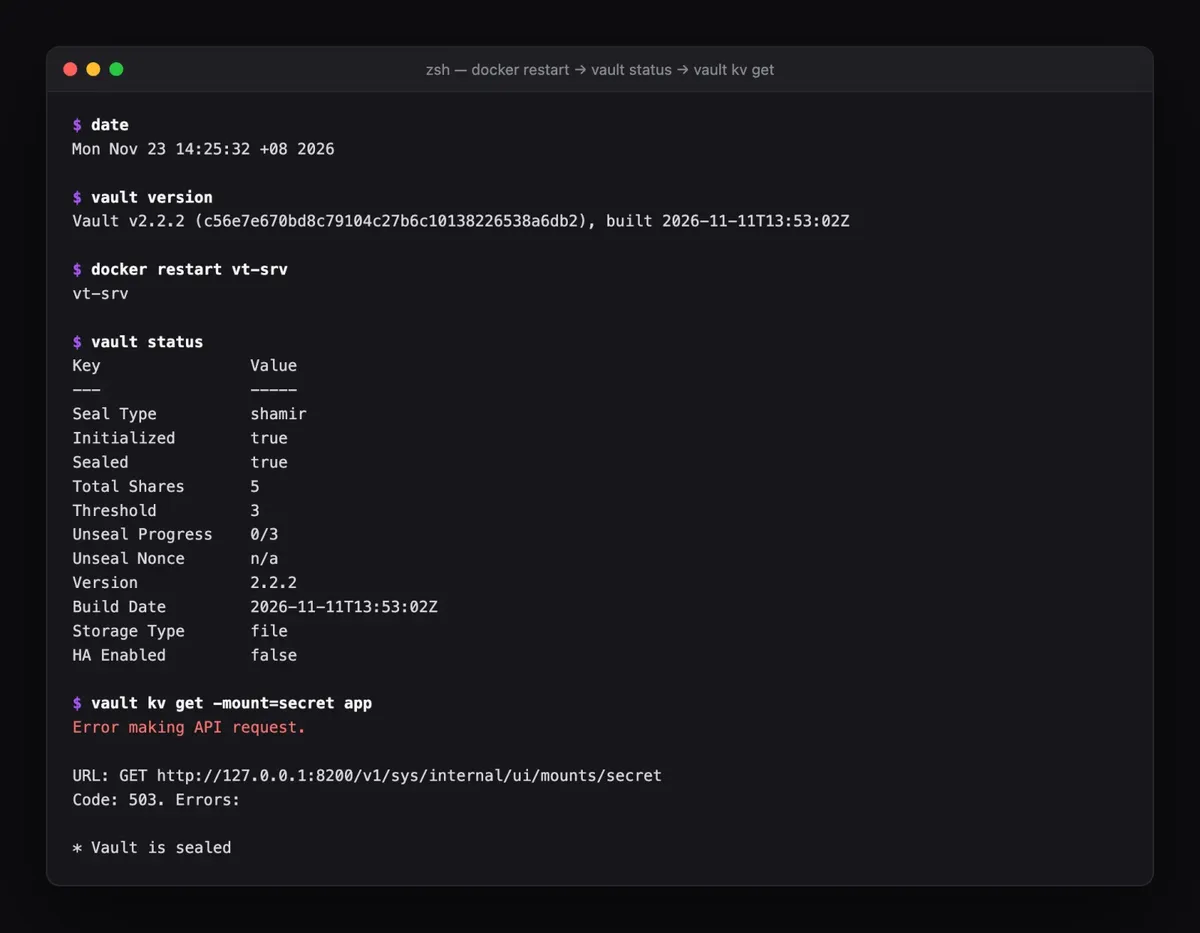
Vault came back sealed, and every request got 503 Vault is sealed until we entered three unseal keys again. We restarted it three times over the day and got the same result each time. That’s by design: Vault’s seal docs say a node stays unsealed until you reseal it, restart it, or storage fails. Production setups use auto-unseal, which hands the job to a cloud key service or a hardware security module. HCP Vault Dedicated, the hosted version, has it set up.
Get the secret into your app with Vault Agent
Your app still needs the value as an environment variable. Vault Agent is a helper process that logs in to Vault, fetches secrets and starts your app with them. Vault can write its config:
cd /app
vault agent generate-config -type=env-template -exec="/app/app.sh" -path="secret/app" /app/agent.hcl
You should see a warning that the generated file “uses ‘token_file’ authentication method, which is not suitable for production environments”. The file tells Agent to read a token from /home/vault/.vault-token. Agent kept retrying with no such file or directory until that file existed, so we wrote the root token into it for the test:
echo "$VAULT_TOKEN" > /home/vault/.vault-token
vault agent -config=agent.hcl -log-level=error | tail -1
Check the variable name before you trust the run. Our app started and printed DB_URL= with nothing after it. We ran it again and got the same empty line. The generated config names the variable after the path and the key together:
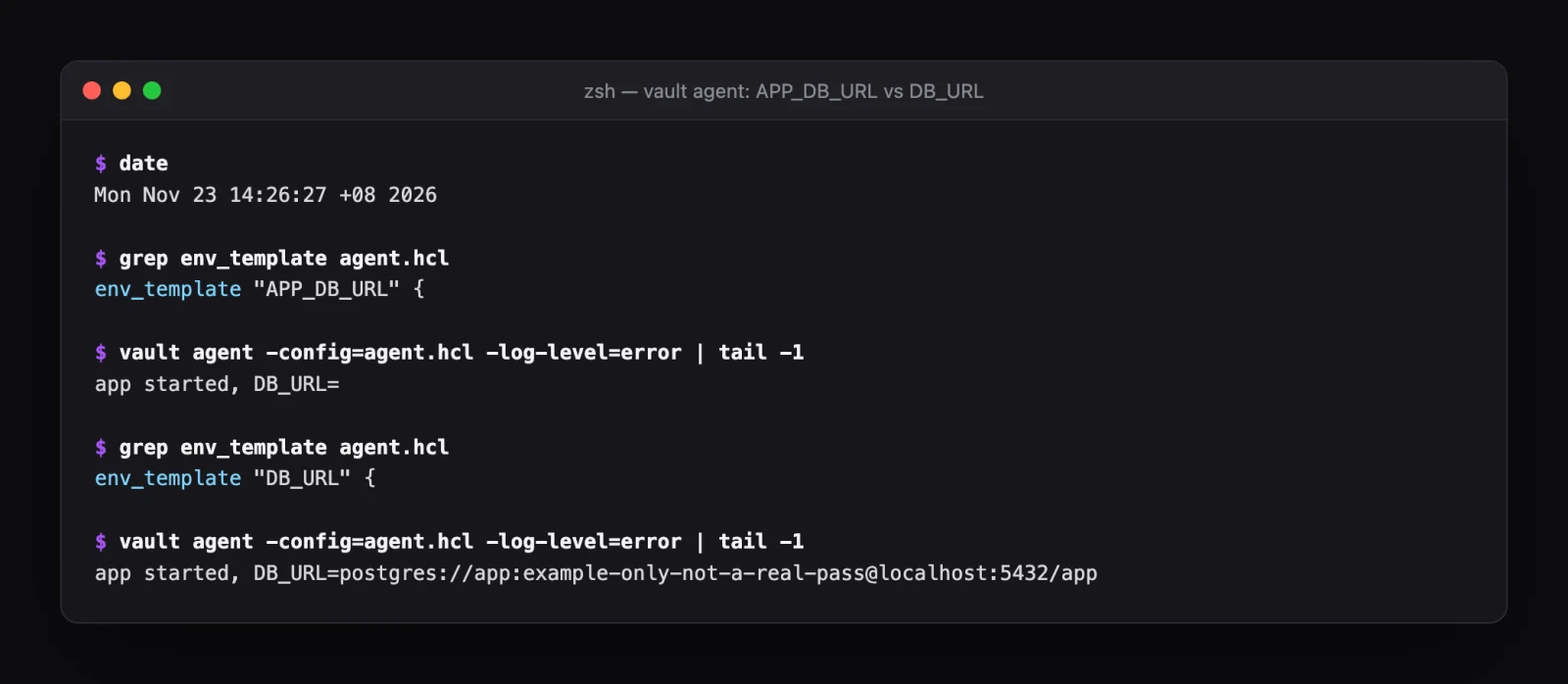
So the app got APP_DB_URL, and it reads DB_URL. Rename the block in agent.hcl to env_template "DB_URL" and run Agent again. This time the full URL comes through.
In total, Vault took 12 commands and 2 config files to a running app, plus three unseal keys after every restart.
Give an AI coding agent names, not values
An AI coding agent often needs to know which variables exist without seeing their values. Both tools can do this.
In Dopbase it’s a built-in level called Names only. Root can’t create personal tokens, so we added an AI agent account called coding-agent in the Admin UI, gave it Names only on the app project, and created a 7-day token for it. Watch one thing in that dialog: the token level starts on Read, so pick Names only there as well.
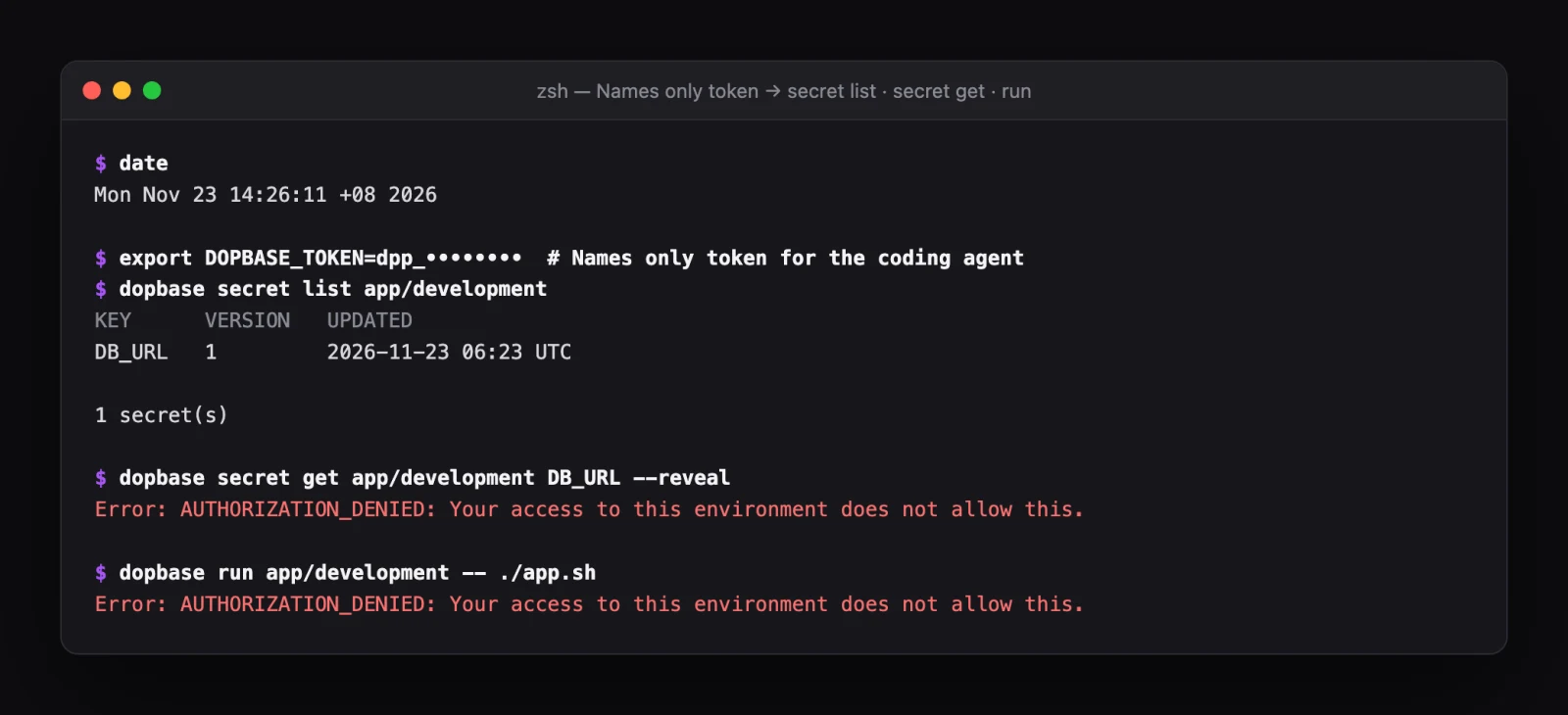
The token lists DB_URL and its version, and both --reveal and dopbase run are refused. The AI agent access guide covers personal tokens and agent accounts.
In Vault you write a policy. We started with list on secret/metadata/*, and that token listed app, the secret’s path, but not the key names inside it. Adding read on secret/subkeys/* fixed that:
path "secret/metadata/*" {
  capabilities = ["list"]
}

path "secret/subkeys/*" {
  capabilities = ["read"]
}
With a token on that policy, vault read secret/subkeys/app showed subkeys map[DB_URL:<nil>], and vault kv get returned 403 permission denied. So Vault can do names only too, once you know which two paths to name.
One limit applies to both tools. If you start the agent inside dopbase run or under Vault Agent, the agent inherits the real values. Start it outside, and give it the names-only token.
Is HashiCorp Vault free and open source?
The license file in Vault’s GitHub repository applies the Business Source License 1.1 to “Vault Version 1.15.0 or later”, with IBM as the licensor. You may use it in production, including inside your own company. You may not offer it as a product that competes with IBM’s. Each version moves to the open source MPL 2.0 license four years after it was published.
So Vault Community Edition costs nothing to run yourself, but it isn’t open source. Vault Enterprise and HCP Vault Dedicated are paid, and HashiCorp’s HCP pricing definitions say Dedicated clusters are charged per hour by edition and size.
For Vault’s features under an open source license, there’s OpenBao. Its site calls it “an open source, community-driven secrets manager and fork of Vault managed by the Linux Foundation’s OpenSSF”. We didn’t test it here.
Dopbase is open source under the Apache 2.0 license and free to run on your own server.
Is Dopbase a good HashiCorp Vault alternative for you?
Pick Dopbase if:
- You want app secrets out of
.envfiles, for yourself or a small team. - Your apps need static values (API keys, database URLs) passed in at start.
- You want a server that comes back after a reboot without anyone typing keys.
- You use AI coding agents and want them to see secret names, not values. Our guide to keeping .env secrets away from AI coding agents covers the rest of that setup.
Pick Vault (or OpenBao) if:
- You need short-lived database or cloud credentials, or certificates.
- You run several servers and need one to take over when another fails.
- You have a platform team to run it, and a plan for unseal keys or auto-unseal.
Comparing more tools? Our secrets management tools roundup covers the wider field.
Run the test yourself
These blocks repeat the main checks. Use sample values only. The Vault block writes unseal keys to init.txt, so delete the file and the container afterwards.
Dopbase (uses the default port 8840, so stop any other local Dopbase server first):
cat > .env <<'EOF'
DB_URL=postgres://app:example-only-not-a-real-pass@localhost:5432/app
EOF
printf '#!/bin/sh\necho "app started, DB_URL=$DB_URL"\n' > app.sh && chmod +x app.sh
DOPBASE_ROOT_EMAIL=admin@example.com dopbase server start --background
dopbase login
dopbase init app/development --from .env
dopbase run app/development -- ./app.sh
dopbase server restart
dopbase run app/development -- ./app.sh
Vault (restart and sealed check):
mkdir -p vault/config vault/file
printf 'storage "file" {\n  path = "/vault/file"\n}\nlistener "tcp" {\n  address = "0.0.0.0:8200"\n  tls_disable = true\n}\napi_addr = "http://127.0.0.1:8200"\ndisable_mlock = true\n' > vault/config/vault.hcl
docker run -d --name vault-test -v "$PWD/vault/config:/vault/config" -v "$PWD/vault/file:/vault/file" hashicorp/vault:2.2.2 server
sleep 3
docker exec -e VAULT_ADDR=http://127.0.0.1:8200 vault-test vault operator init > init.txt
for i in 1 2 3; do docker exec -e VAULT_ADDR=http://127.0.0.1:8200 vault-test vault operator unseal "$(grep "Unseal Key $i:" init.txt | awk '{print $4}')" | grep -E 'Sealed|Progress'; done
docker restart vault-test && sleep 3
docker exec -e VAULT_ADDR=http://127.0.0.1:8200 vault-test vault status | grep -E 'Sealed|Progress'
docker rm -f vault-test && rm init.txt
The last status should say Sealed true and Unseal Progress 0/3.
Questions
Is HashiCorp Vault free?
Vault Community Edition is free to run, including in production inside your company, but not as a competing product. Vault Enterprise and HCP Vault Dedicated are paid.
Is HashiCorp Vault still open source?
No. Vault 1.15.0 and later use the Business Source License 1.1, and each version becomes MPL 2.0 four years after release. OpenBao is an open source fork.
What is the best open source alternative to HashiCorp Vault?
For Vault’s features, such as dynamic secrets and PKI, OpenBao is the closest match. For storing app secrets and passing them to processes, Dopbase does it with less setup under Apache 2.0.
Why does Vault need to be unsealed after a restart?
Vault doesn’t store the root key that decrypts its data. By default it needs 3 of 5 unseal keys to rebuild it after every restart. Auto-unseal hands that to a cloud key service or a hardware module.
Can I use Dopbase and Vault together?
Dopbase has no Vault integration, and we didn’t test them together. Teams can still split the work: Vault for dynamic credentials, Dopbase for app secrets and local development.
Conclusion
From the comparison above, Dopbase won on setup and everyday use. It took 4 commands and no config files to get a secret into our app, against Vault’s 12 commands, 2 config files, 5 unseal keys and a root token. After a restart, Dopbase kept serving while Vault waited for three of its five unseal keys. That’s less to install, less to keep safe and less to run.
My tip: if you need secrets for your apps but don’t want to run secrets infrastructure, start with Dopbase. Install it, start the server, import your .env, and run your app with it:
curl -fsSL https://dopbase.com/install.sh | sh
DOPBASE_ROOT_EMAIL=admin@example.com dopbase server start --background
dopbase login
dopbase init app/development --from .env
dopbase run app/development -- ./app.sh
Vault is worth its setup when you need dynamic credentials, certificates or a cluster and have a team to run it. We didn’t test Vault Enterprise or auto-unseal, which take some of that work away.