Varlock vs dotenvx vs Dopbase for AI Coding Agents
Varlock, dotenvx and Dopbase all keep .env values away from coding agents, in different ways. Compare how each works, what it stops and its limits.
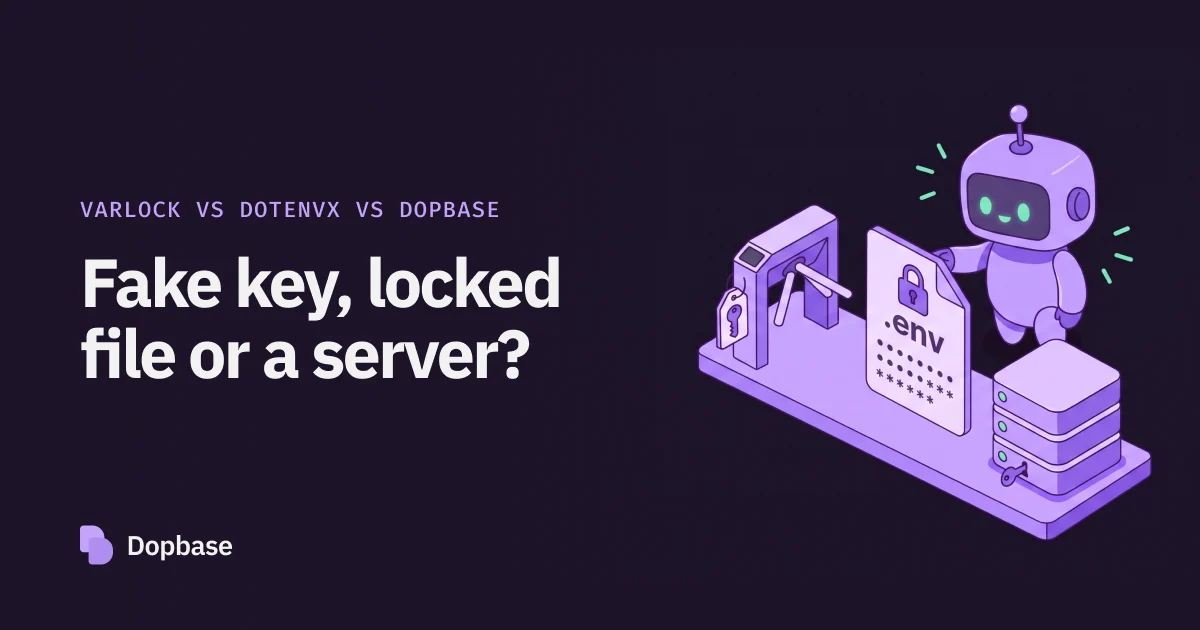
Varlock vs dotenvx is a fair question once a coding agent works in a project with a .env file. I was curious how the two really differ with an agent in the room. Dopbase does the same job a third way, so I added it. Here is the short version:
- Varlock hands the agent a fake value and swaps in the real one on its way out to the API.
- dotenvx encrypts the values in
.env, so the file the agent opens holds ciphertext. - Dopbase keeps the values on a server, and the agent gets a token that can see the names and nothing else.
I installed all three in a throwaway Docker container (Varlock 1.25.0, dotenvx 2.38.2, Dopbase 0.2.0, Debian 12 on macOS, 24 November 2026). Then I ran the commands an agent with a shell would run. I didn’t start a real agent. In this article, I’ll share how each tool works, a short working example for each, what each one stops and what it doesn’t.
The problem all three solve
A coding agent works inside your project folder, and a .env file sits right there. .gitignore keeps the file out of Git, but it doesn’t hide it from a program that can open files. Can AI coding agents read your .env file? walks through why, and the .claudeignore test shows that an ignore file for the agent doesn’t fix it either.
So the question every tool here answers is the same: how does the app get the real value while the agent doesn’t?
They answer it at three different points. Varlock steps in at the network. dotenvx steps in at the file. Dopbase steps in at the account. Where they step in decides what the agent can still do.
For the test, every tool got the same two sample values:
STRIPE_KEY=sk_test_example_only_not_real
DATABASE_URL=postgres://app:example-only@db:5432/app
Varlock
Varlock starts from a schema: a .env.schema file that describes each variable in comments like @sensitive. The values come from a plugin for a secret store such as 1Password, or are encrypted on your machine.
The part that matters for agents is the credential proxy, which Varlock added in July 2026 and called a preview in its July recap. You mark a secret with @proxy(domain="..."). Then varlock proxy run starts your command with a placeholder in place of the secret, and a local proxy puts the real value back into requests going to that domain.
I used httpbin.org as a stand-in for api.stripe.com, because it echoes back the headers it receives:
cat > .env.schema <<'EOF'
# @defaultSensitive=true
# ---
# @proxy(domain="httpbin.org")
# @placeholder=sk_test_000000000000000000000000
STRIPE_KEY=
EOF
printf 'STRIPE_KEY=%s\n' "$(printf %s 'sk_test_example_only_not_real' | varlock encrypt 2>/dev/null | grep -o 'varlock(.*)')" > .env.local
varlock proxy run --no-redact-stdout -- sh -c 'echo $STRIPE_KEY'
varlock encrypt --file opens an interactive picker, which stopped in my script, so I piped one value at a time.
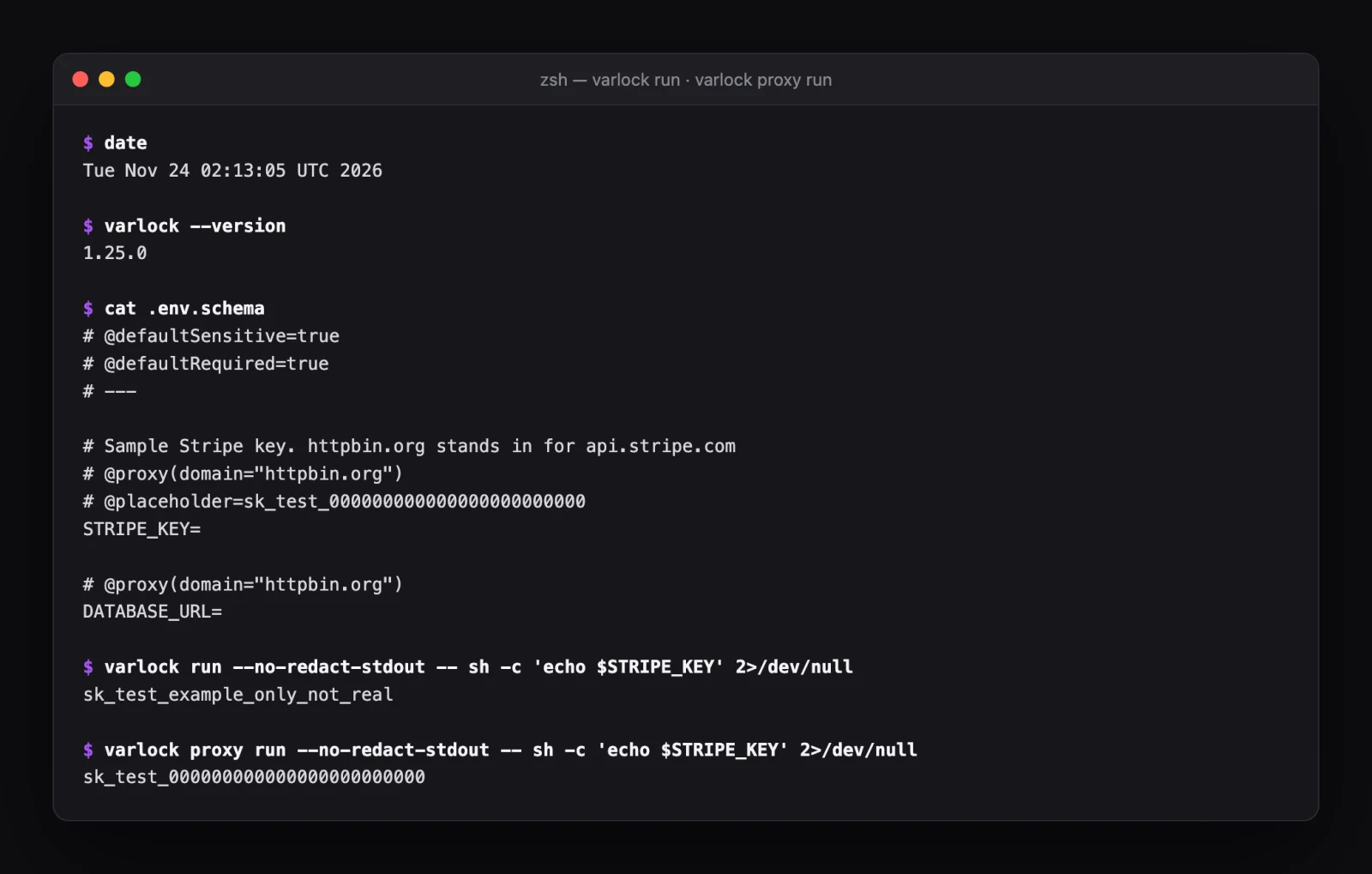
Plain varlock run gives the child the real value. varlock proxy run gives it the placeholder.
To my surprise, the placeholder held even when the child ran varlock printenv and varlock load itself. A request to httpbin came back with the placeholder too, while the proxy’s audit file said "injected":true. So httpbin got the real key, and Varlock scrubbed it from the reply.
Then I asked for the same echo gzipped:
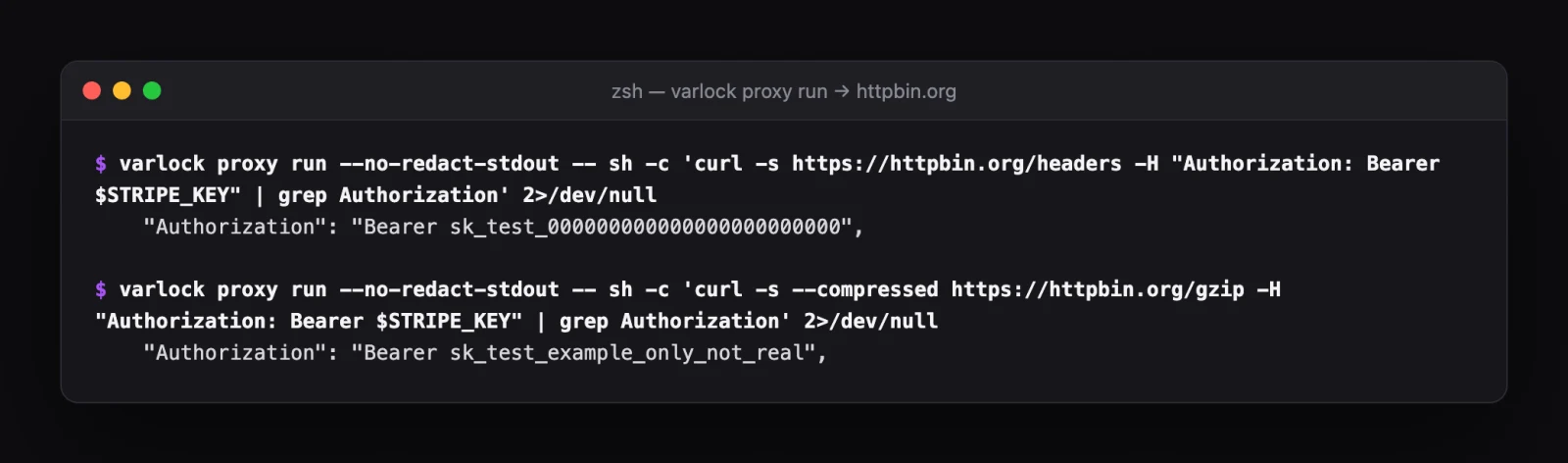
A compressed reply from a host that echoes headers carries the real value back to the child. I ran it twice.
Varlock documents this. Its proxy guide says compressed or large replies pass through unscrubbed, and that the proxy runs as you on the same machine and is not a sandbox. For a real wall it points to --sandbox (macOS) or --sandbox=docker, which I didn’t test.
My verdict: the only tool here where the agent can use a key without holding it. What I don’t like is how much depends on details: plain varlock run gives the real value, every secret needs its own @proxy line, and the safety of an echo depends on its encoding.
dotenvx
dotenvx comes from the author of dotenv. It encrypts each value in your .env with a public key, so the file can live in Git. The private key that decrypts it goes into a separate .env.keys file next to it.
printf 'STRIPE_KEY=sk_test_example_only_not_real\n' > .env
dotenvx encrypt
dotenvx run -- printenv STRIPE_KEY
I ran dotenvx without a terminal attached, and dotenvx encrypt took 0.37 seconds and asked nothing. In a terminal, dotenvx’s Docker guide says it asks where to keep the private key; the Classic option writes .env.keys. (Inside my container’s terminal, encrypt and get sat on a spinner, so I didn’t test that prompt.) After encrypting, .env holds DOTENV_PUBLIC_KEY and lines like STRIPE_KEY=encrypted:BClvse.... Variable names stay readable.
So if an agent opens .env, it reads ciphertext. That’s a real improvement over a plain file. .env.keys even gets file mode 600, but that only keeps out other users, and the agent runs as you. Look at the folder:
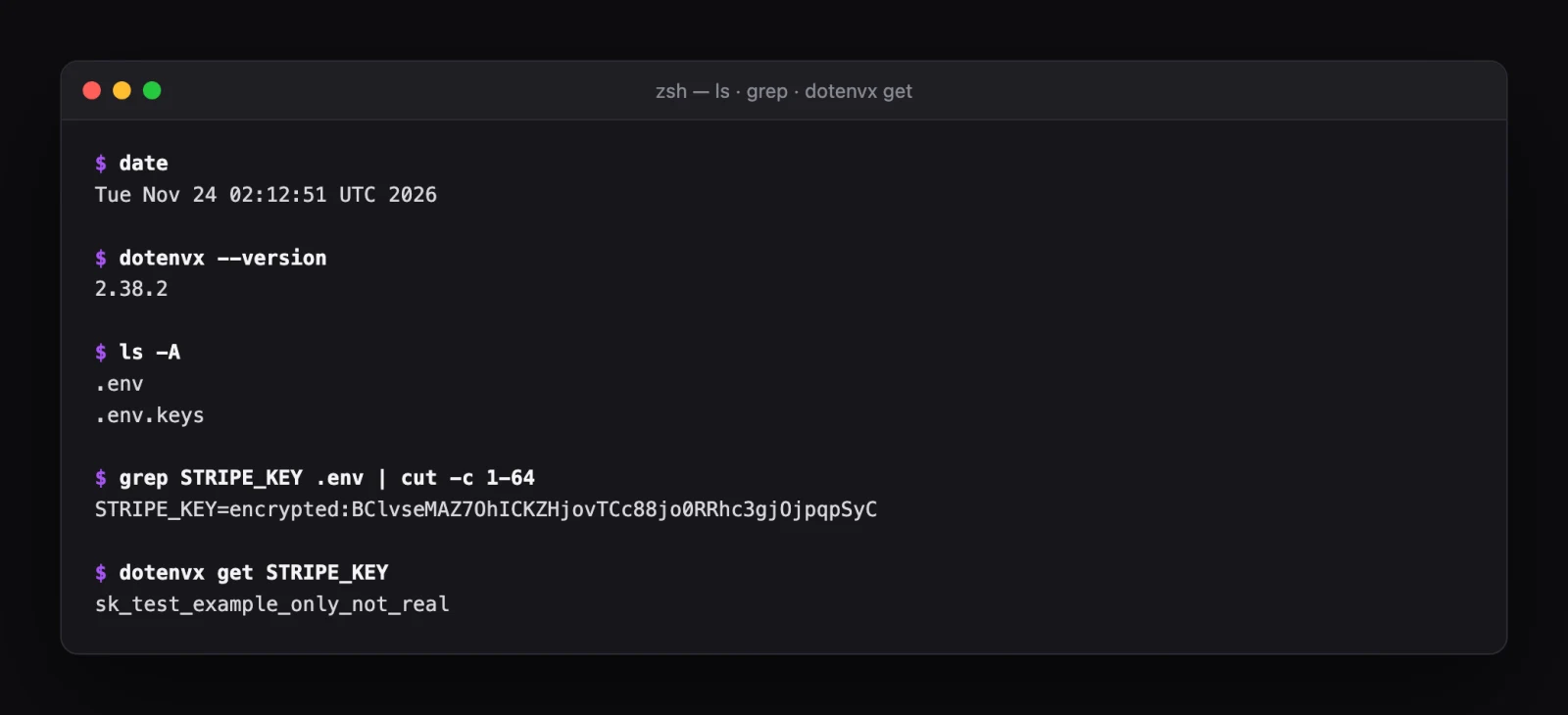
The private key sits next to the encrypted file, so dotenvx get decrypts with no flags.
An agent with a shell in that folder can run dotenvx get, dotenvx run or dotenvx decrypt --stdout, and I got the plain value back from all three. dotenvx doesn’t hide that: its docs tell you to keep .env.keys out of Git and share the private key separately.
The CLI can also move the private key off the disk: into your OS secret store, 1Password, Bitwarden or Armor, dotenvx’s hosted key service. Per the docs, Armor can ask you to approve a request before a key is handed out, and its changelog mentions auditing CLI commands. I didn’t test any of these (Armor needs an account, and the container has no OS secret store).
My verdict: the fastest setup of the three, and the encrypted file is simple to share through Git. It protects the file from being read. It doesn’t protect the value from an agent that can run dotenvx in your folder while .env.keys sits there.
Dopbase
Dopbase is a secrets manager for developers and AI coding agents. Values live on a server, grouped by project and environment, and dopbase run hands one environment to one command as environment variables. There’s no file with values in the project once you delete the .env you imported.
DOPBASE_ROOT_EMAIL=you@example.com dopbase server start --background
dopbase login
dopbase init shop/dev --from .env
rm .env
dopbase run shop/dev -- printenv STRIPE_KEY
The agent gets its own account (AI agent access in the docs covers the options). In the Admin UI I added an AI agent called coding-agent, gave it Names only on the shop project and created a token. With that token in DOPBASE_TOKEN, the agent can list names, versions and dates, which is enough to check that every variable the code needs exists. It can’t see a value:
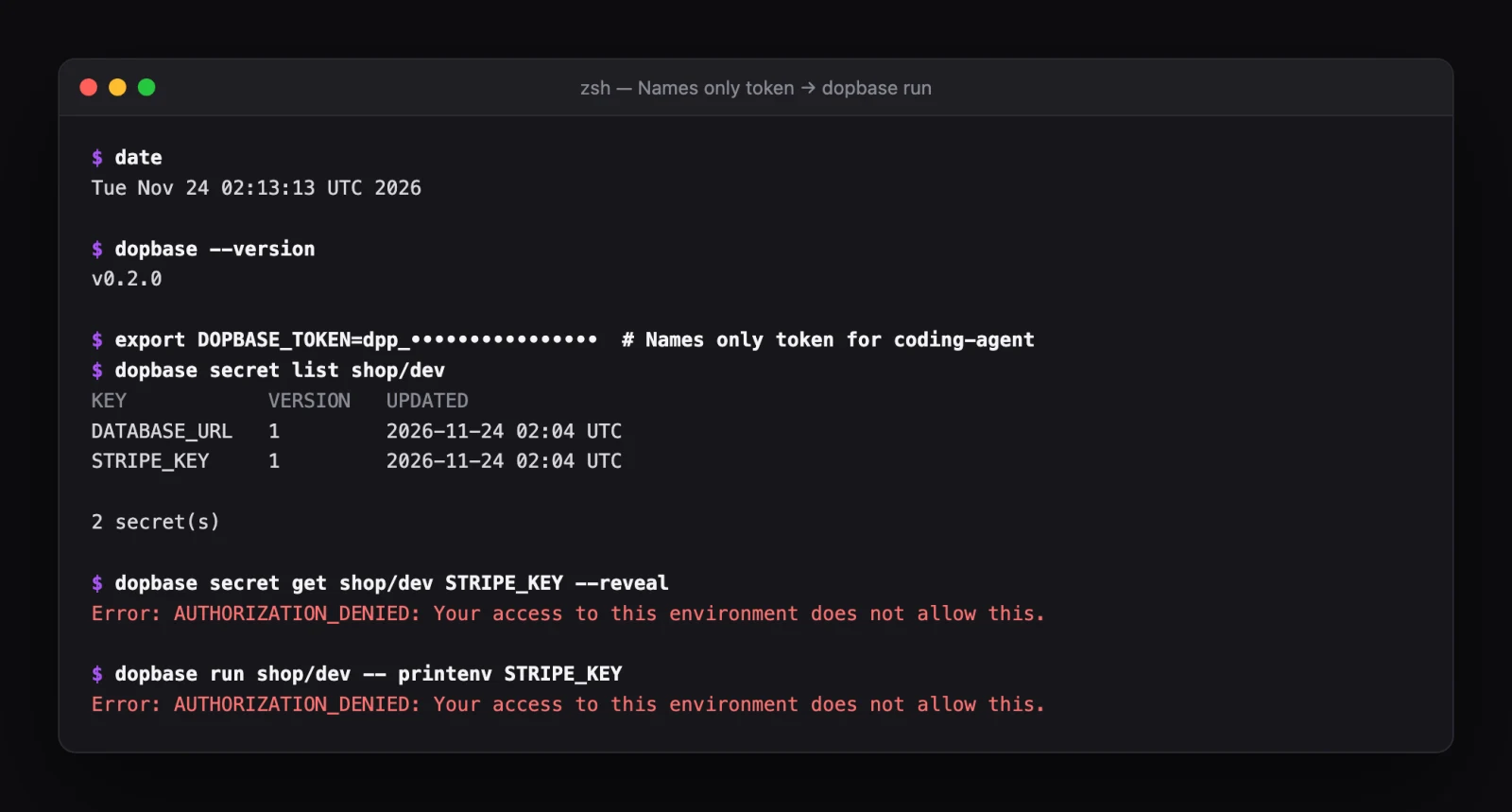
A Names only token lists the keys and is refused on --reveal and dopbase run.
Next, I raised the agent to Read, made a new token (which revoked the old one) and ran a command with real values. The audit log names the agent account, not me:
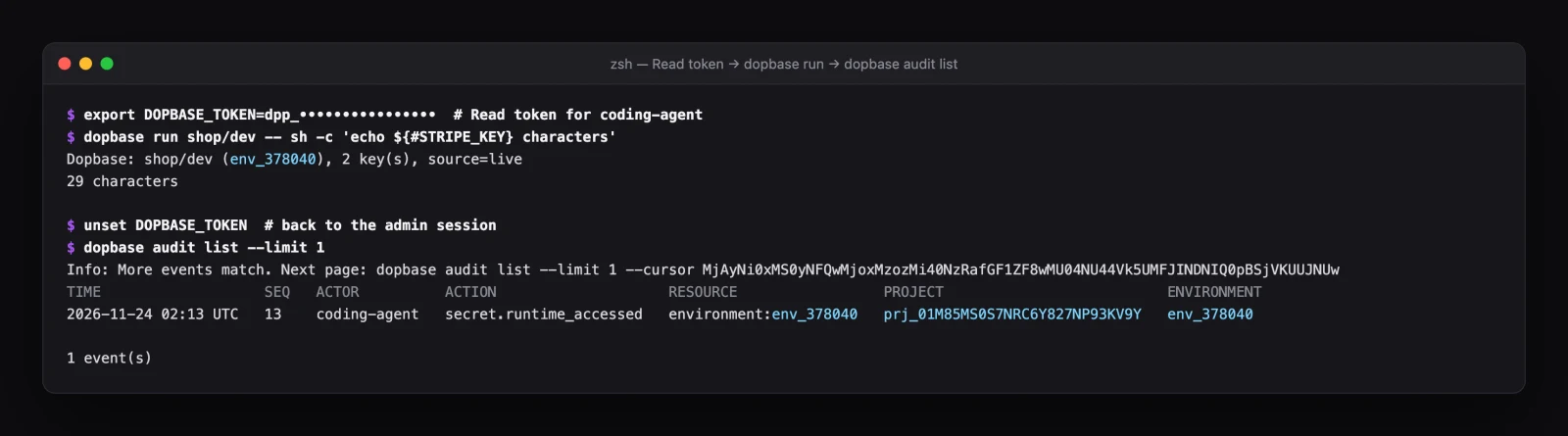
The live run with real values is recorded against the agent account that made it.
Now the limits. Dopbase has no placeholder or proxy mode: a command started with dopbase run gets the real values, and an agent you start inside it inherits them too. dopbase init --from .env leaves the .env file where it was, so the rm is your job. And dopbase run keeps an encrypted runtime cache on the local machine. One more thing from my run: every command without a token in DOPBASE_TOKEN ran as my signed-in admin session (that’s how I read the audit log). An agent shell without its own token would act as you.
My verdict: the most setup of the three: a server, a login and an agent token. That setup is aimed at more than one person or agent, where you need to know who read what. It does nothing for the moment a value is in use, which is exactly where Varlock works.
Varlock vs dotenvx vs Dopbase side by side
| Varlock 1.25.0 | dotenvx 2.38.2 | Dopbase 0.2.0 | |
|---|---|---|---|
| Where values live | Your secret store via a plugin, or encrypted on this machine | Encrypted in .env, key in .env.keys or a key store |
On a Dopbase server |
| What the agent sees | Placeholders under proxy run, real values under plain run |
Names and ciphertext, plus .env.keys if it’s in the folder |
Names, versions and dates with a Names only token |
| Team access | Through the secret store behind it; local encryption is tied to one device | Commit .env, share the private key, or use Armor |
Users, roles and grants per project or environment |
| Audit log | Per-session proxy log on your machine | None in my test; Armor’s changelog mentions CLI auditing | Server-side log that names the account |
| Placeholder proxy | Yes, for HTTPS hosts you list | No | No |
| Setup in my test | A schema with @proxy per secret, varlock encrypt per value, then varlock proxy run |
dotenvx encrypt, then dotenvx run |
Start a server, log in, dopbase init, then an agent token in the Admin UI |
The other tools’ facts were checked against varlock.dev and dotenvx.com on 24 November 2026.
Which one fits you
You work alone, and your agent mostly calls HTTPS APIs. Varlock is the one I’d look at first. It’s the only option here where the agent can run the code that calls Stripe without ever holding the key. Add its sandbox mode if you want a real wall.
You work alone and want the least setup. dotenvx gets your file encrypted in one command, and your values can travel through Git with the code. Don’t leave .env.keys in the folder the agent works in, or the encryption doesn’t buy you much against it. dotenvx can keep the key in your OS key store or a password manager instead, though I didn’t test whether that stops an agent running as you from calling dotenvx get.
You share secrets with a team, or you run agents as their own accounts. That’s where Dopbase fits. Each person and agent gets its own access and token, one environment stays apart from another, and the log shows who read what.
As you can probably see, a solo developer may be fine with Varlock or dotenvx. Running a server for one person on one laptop is often more than the job needs.
What none of them stop
All three get a value to the app. None of them can tell whether the app is doing something you’d approve of.
- Code the agent wrote. If the agent adds
console.log(process.env.STRIPE_KEY)and you run that code withvarlock run,dotenvx runordopbase run, it prints the real value. Onlyvarlock proxy runwould print a placeholder there. Review it before a run with real values. How to keep .env secrets away from AI coding agents has a routine for that. - An agent started inside the wrapper.
varlock run,dotenvx runanddopbase runall give the child process the real values. Start the agent outside them. - An agent with your shell and your login. It can run the same CLI you run:
dotenvx getwith.env.keyspresent, ordopbasewith your saved session and no token of its own. Varlock’s own docs say the same about its proxy without a sandbox. - A service that sends the secret back. As the gzip test showed, a host that echoes a credential can return it to whatever called it.
So start at the point (network, file or account) where your agent worries you most.
Sources
- Varlock, “Credential proxy” guide, checked 24 November 2026
- Varlock, “July 2026 Recap”, checked 24 November 2026
- Varlock, “Secrets management” guide, checked 24 November 2026
- dotenvx, “.env (encrypted)” docs, checked 24 November 2026
- dotenvx, “Armor” key custody docs, checked 24 November 2026
- dotenvx, changelog, checked 24 November 2026