How to use TruffleHog to find secrets in a Git repo
How to use TruffleHog 3.100 to scan Git history and folders for secrets, what verified and unverified mean, and which .env values it lets through.
You ran TruffleHog on a repo where you know a password sits in a file. It printed a pig banner, two log lines and unverified_secrets: 0. Or it found something and printed your database password in full. Either way, you’re not sure what it checked.
TruffleHog is an open-source scanner that finds credentials in Git history and folders, then asks the provider whether each one still works. It only reports values it recognizes, like a Postgres connection string or a GitHub token, so a random-looking token in your .env usually goes straight past it. I’ll show you how to install it, read a scan, catch what it skips, scan files Git ignores, and block a commit with the pre-commit hook.
Every command here ran on TruffleHog 3.100.0, git 2.39.5, pre-commit 4.7.0 and Dopbase 0.2.0 in a Debian 12 container, on 22 November 2026. The commands are for macOS and Linux. We didn’t test the GitHub Action, TruffleHog Enterprise, or scans of GitHub orgs, S3 or Docker images.
Contents
- What TruffleHog does
- What you need
- 1. Install TruffleHog
- 2. Scan a Git repo
- 3. Read verified, unverified and unknown
- 4. Catch generic .env values with a custom detector
- 5. Scan files Git doesn’t track
- 6. Block a commit with the TruffleHog pre-commit hook
- 7. Ignore a false positive
- Move the .env out of the repo with Dopbase
- Run the test yourself
- Questions
- Conclusion
What TruffleHog does
TruffleHog works in two passes. First it runs detectors over your files. A detector is a rule for one kind of credential, and the README says TruffleHog “classifies over 800 secret types”. Then it tries to log in with each match. The README’s example is the AWS detector, which calls AWS’s GetCallerIdentity API with the key it found.
That second pass, verification, gives every finding one of three results:
| Result | What it means |
|---|---|
| verified | The provider accepted the credential. It works now. |
| unverified | TruffleHog asked, and the provider said no. |
| unknown | TruffleHog got no answer (no network, host not found). |
So verification sends the value it found to the provider. With networking turned off, our AWS check failed with lookup sts.us-east-1.amazonaws.com ... network is unreachable. --no-verification turns that pass off.
What you need
- A terminal on macOS or Linux, and Git
- A repo to scan. Run the test yourself builds a throwaway one.
- For step 6 only: pre-commit, the Python tool that runs Git hooks from a config file
- For the Dopbase section only: the
dopbaseCLI, a server and a login, set up with the quick start
1. Install TruffleHog
Use Homebrew or the install script from the README:
brew install trufflehogcurl -sSfL https://raw.githubusercontent.com/trufflesecurity/trufflehog/main/scripts/install.sh | sh -s -- -b /usr/local/binWe used the Linux release archive, checked against the release’s checksums.txt. Then:
trufflehog --versionYou should see trufflehog 3.100.0. If you see a 2.x version, you have the old Python tool from pip, and its --regex and --entropy flags don’t exist in version 3.
2. Scan a Git repo
Our test repo had one commit: config.js with a hardcoded PAYMENT_TOKEN, and app.env with eight sample lines (the values from our gitleaks test, plus AWS’s documented example key pair).
Before you scan a real repo: TruffleHog prints every value it finds in full, in --json output too, and we found no flag that hides it. Run the scan yourself, not through an AI coding agent, or the values land in the agent’s context. Run this inside the repo:
trufflehog --no-update git file://.git tells TruffleHog to read every commit, and file://. points it at the repo in this folder.
Keep --no-update. TruffleHog checks for a newer version on every start and tries to replace its own binary. In our container it couldn’t write to /usr/local/bin, so the first run stopped before scanning:
error trufflehog error occurred with trufflehog updater 🐷 {"error": "cannot move binary (exit status 1)"}With the flag, you should see one finding (trimmed):
Found unverified result 🐷🔑❓
Verification issue: lookup db.internal.example on 0.250.250.200:53: no such host
Detector Type: Postgres
Raw result: postgres://app:Xk29vLq7WmT4pRz8@db.internal.example:5432
...
File: app.env
Line: 3
...
finished scanning {"chunks": 3, "bytes": 512, "verified_secrets": 0, "unverified_secrets": 1, ...}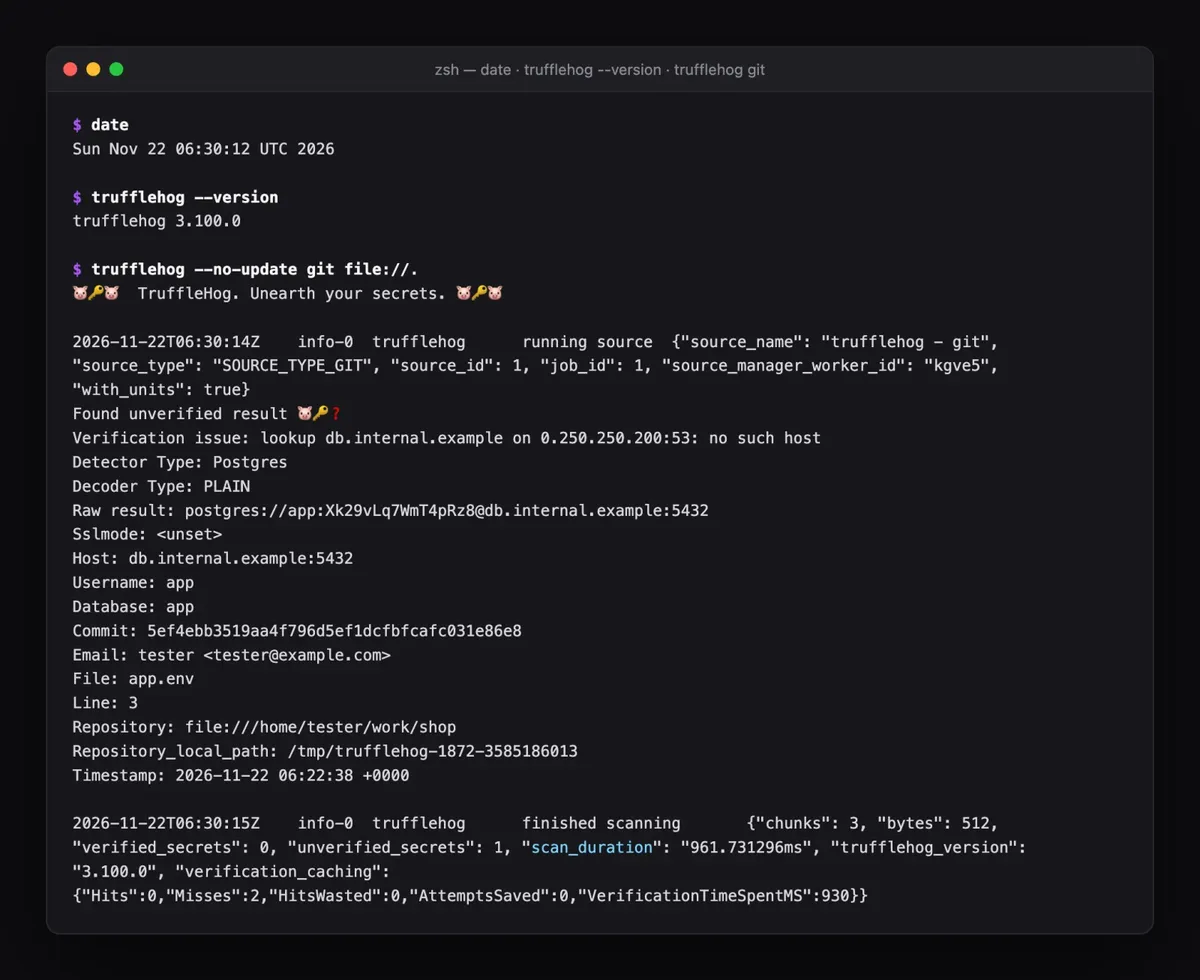
The token in config.js and the other seven lines of app.env went through without a word. Step 4 shows why.
The scan exits with 0 even when it finds something. Add --fail to get exit code 183 instead, which is what a hook or CI job needs.
3. Read verified, unverified and unknown
Many guides add --only-verified. On a repo with sample values, you get the banner and nothing else:
finished scanning {"chunks": 3, "bytes": 512, "verified_secrets": 0, "unverified_secrets": 0, ...}A sample value never works at the provider, so it can’t be verified. --only-verified is now hidden from --help, and the README uses --results=verified instead. Both gave us the same empty output. To see a verified result, scan the repo Truffle Security keeps for this:
trufflehog --no-update git https://github.com/trufflesecurity/test_keys --results=verifiedYou should see two findings that start with ✅ Found verified result.
One label confused us. The Postgres finding says Found unverified result, but its result is unknown: the host doesn’t exist, so the check failed instead of getting a no. --results=unknown printed it, and --results=unverified didn’t. That matters in step 6.
4. Catch generic .env values with a custom detector
The README says its built-in detectors won’t catch generic values like *.password= in a .env file. For those, it suggests a custom detector, a regex in a config file. The repo ships one at examples/generic_config_secrets.yml:
curl -sSfL -o generic.yml https://raw.githubusercontent.com/trufflesecurity/trufflehog/v3.100.0/examples/generic_config_secrets.yml
trufflehog --no-update git file://. --config generic.yml
Here’s what each line of app.env got. The last column is gitleaks 8.30.1 on the same repo, run offline with --redact.
| Line in app.env | TruffleHog default | With generic.yml | gitleaks 8.30.1 |
|---|---|---|---|
PAYMENT_TOKEN= 32 random characters |
not found | found | found |
PAYMENT_REF= the same value |
not found | not found | not found |
DATABASE_URL=postgres://app:... |
found (Postgres) | found (Postgres) | not found |
DB_PASSWORD=Xk29vLq7WmT4pRz8 |
not found | found | found |
SMTP_PASSWORD=Nw7Kp2Qx9Lm4Zr8T |
not found | found | found |
SESSION_TOKEN=abc123 |
not found | found | not found |
| AWS example key pair from AWS’s docs | filtered out | filtered out | not found |
The custom detector also caught the token in config.js. PAYMENT_REF got past everything, because its name has no word like TOKEN or PASSWORD. The AWS pair is detected and then dropped. You only see it with --results=verified,unknown,unverified,filtered_unverified.
5. Scan files Git doesn’t track
Your real .env is probably in .gitignore. That keeps it out of commits, and out of trufflehog git, which only reads commits. We put the Postgres URL in an ignored .env and scanned both ways:
trufflehog --no-update git file://. --fail
trufflehog --no-update filesystem . --fail
The git scan found nothing and exited with 0. The filesystem scan reads every file in the folder, ignored or not. You should see the Postgres finding in File: .env and exit code 183.
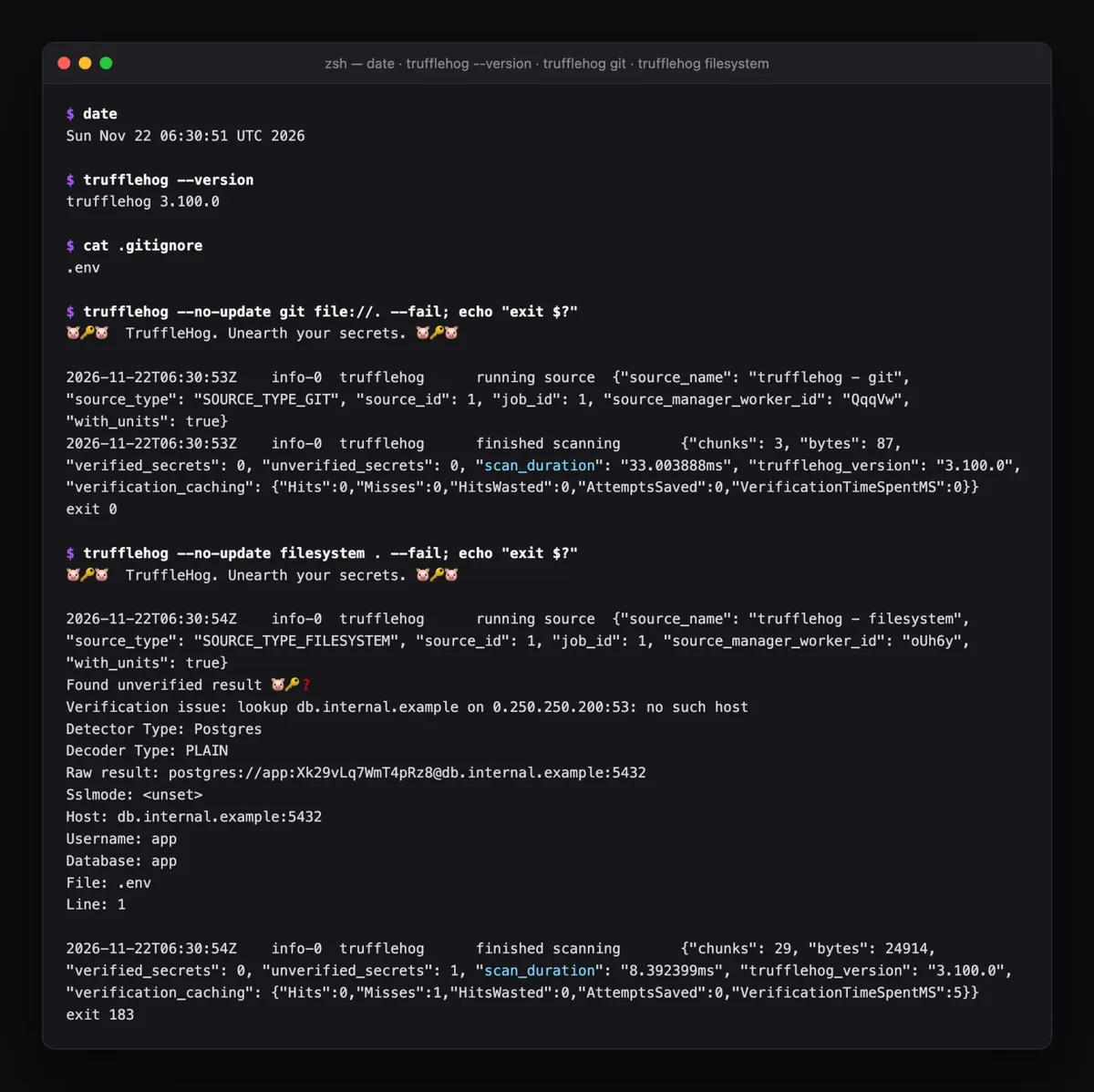
A clean git scan only means your commits are clean. The file is still on disk, and a coding agent in the folder can read it.
6. Block a commit with the TruffleHog pre-commit hook
A pre-commit hook runs TruffleHog on your staged changes before Git saves the commit. PreCommit.md gives two configs for the pre-commit framework. Use the short one, in .pre-commit-config.yaml at the repo root:
repos:
  - repo: local
    hooks:
      - id: trufflehog
        name: TruffleHog
        description: Detect secrets in your data.
        entry: bash -c 'trufflehog --no-update git file://.'
        language: system
        stages: ["pre-commit", "pre-push"]
Without --no-update, our hook failed with the updater error from step 2. Then install it:
git add .pre-commit-config.yaml
pre-commit install
Stage the config after every edit. When we forgot, pre-commit refused the commit with Your pre-commit configuration is unstaged.
TruffleHog notices pre-commit and picks its own flags (Running as a pre-commit hook, overriding default flags for hook context). The other config sets --results=verified,unknown itself, and the two disagree. We committed a fake GitHub token with each, twice:
| Staged file | Short config | Config with --results=verified,unknown |
|---|---|---|
| Postgres URL, host not found | blocked | blocked (result is unknown) |
Fake ghp_ GitHub token |
blocked | committed |
GitHub rejected the fake token, so it was unverified, and the second config only stops verified and unknown results. A token you already revoked would probably pass the same way. If your hook lets a made-up key through, this is why.
Anyone can skip a hook. SKIP=trufflehog git commit printed Skipped, and git commit --no-verify skipped every hook. For CI, the README’s example is trufflehog git file://. --since-commit main --branch feature-1 --results=verified,unknown --fail. We didn’t run it in CI.
Check it works
Stage the sample Postgres URL and commit:
printf 'DATABASE_URL=postgres://app:Xk29vLq7WmT4pRz8@db.internal.example:5432/app\n' > db.env
git add db.env
git commit -m "add db"
You should see:
TruffleHog...............................................................Failed
- hook id: trufflehog
- exit code: 183
git log shows the commit didn’t happen.
7. Ignore a false positive
For a test fixture or a value you’ve accepted, mark the line:
DATABASE_URL=postgres://app:Xk29vLq7WmT4pRz8@db.internal.example:5432/app # trufflehog:ignoreTruffleHog skipped that line, and --no-ignore-tag brought it back. To skip whole files, put one regex per line in a file and pass it with --exclude-paths. A file holding app\.env$ made our git scan come back empty.
Move the .env out of the repo with Dopbase
Dopbase is a secrets manager for developers and AI coding agents. It keeps each project’s values on a Dopbase server, split by environment, and dopbase run starts your command with one environment’s values as environment variables. With no .env in the folder, step 5 has nothing to find.
Run plain dopbase init in the folder. It asks before importing, asks for a project/environment name, then offers to delete the file (trimmed):
.env found
2 variables detected
...
✓ Imported 2 variables into shop/development.
✓ Secrets encrypted.
> Delete .env now? Yes
✓ .env deleted.
In our gitleaks test, dopbase init shop/development --from .env imported but didn’t offer the delete. After the import, trufflehog filesystem . --fail found nothing and exited with 0. Your app gets the values when you start it through Dopbase:
dopbase run shop/development -- sh -c 'echo "PAYMENT_TOKEN has ${#PAYMENT_TOKEN} characters"'You should see:
Dopbase: shop/development (env_138127), 2 key(s), source=live
PAYMENT_TOKEN has 32 characters
When TruffleHog finds a key that works, revoke it at the provider first. Then save the new one:
dopbase secret set shop/development PAYMENT_TOKEN
dopbase secret history shop/development PAYMENT_TOKEN
In a terminal, secret set prompts for the value, so it stays out of your shell history (we piped ours in with --stdin). secret history listed v2 as current and v1 as available.
What this doesn’t cover:
- Dopbase doesn’t scan code. A key pasted into
config.jsstill needs TruffleHog. - Dopbase doesn’t revoke keys at the provider.
- A coding agent started inside
dopbase runinherits the values. Start it outside. The AI coding workspace post covers the rest.
Run the test yourself
This builds a small repo with sample values and runs three scans:
mkdir th-test && cd th-test && git init -q
printf 'DATABASE_URL=postgres://app:Xk29vLq7WmT4pRz8@db.internal.example:5432/app\nPAYMENT_TOKEN=q8ZrT3mW9xLk2PvN7bHc4YdF6gJs1Ra5\n' > app.env
git add app.env && git commit -qm "add app.env"
trufflehog --no-update git file://. --fail; echo "exit $?"
trufflehog --no-update git file://. --results=verified; echo "exit $?"
printf '.env\n' > .gitignore && mv app.env .env
trufflehog --no-update filesystem .env --fail; echo "exit $?"
The first scan finds the Postgres URL and exits with 183. The second prints no findings and exits with 0. The third finds the URL in .env, which Git ignores. PAYMENT_TOKEN isn’t reported at all.
Questions
How does TruffleHog work?
It matches your files or Git history against over 800 types of credential, then tries each match against the provider’s API. Every finding comes back as verified, unverified or unknown. A value no detector recognizes isn’t reported.
Is TruffleHog good?
Yes, at telling you which leaked keys still work, which is what matters after a leak. It’s weak on generic values: our default scan reported one of eight .env lines, and a custom detector brought that to five.
TruffleHog vs gitleaks: which should I use?
TruffleHog tells you which findings are live. Gitleaks stays offline and can redact what it prints. On the same .env lines each caught a value the other missed, so running both is a sound choice.
Is TruffleHog free?
Yes. The scanner is open source under the AGPL-3.0 license, as it has been since version 3.0. Truffle Security also sells TruffleHog Enterprise, which we didn’t test.
What does –only-verified do in TruffleHog?
It shows only findings the provider confirmed as working, the same as --results=verified, and it’s now hidden from --help. With sample values it shows nothing, because a made-up key can’t be verified.
Conclusion
TruffleHog finds credentials it recognizes and tells you which ones still work. It misses generic .env values unless you add a custom detector, and trufflehog git never sees a file Git ignores. My tip: run trufflehog --no-update filesystem . --fail on your project folder once before you trust a clean Git scan.
We didn’t test the GitHub Action, or what the updater does on a Homebrew install.