Gitleaks: scan a repo for secrets, and what it misses
How to use gitleaks 8.30.1 to scan Git history and a folder for secrets, set up the pre-commit hook, and see which values it lets through.
Gitleaks is an open-source scanner that looks for API keys, tokens and passwords in a Git repository’s history (gitleaks git) or in a folder (gitleaks dir). Run gitleaks git -v inside the repo, and it prints each finding and exits with code 1. The pre-commit hook stops a secret before the commit exists.
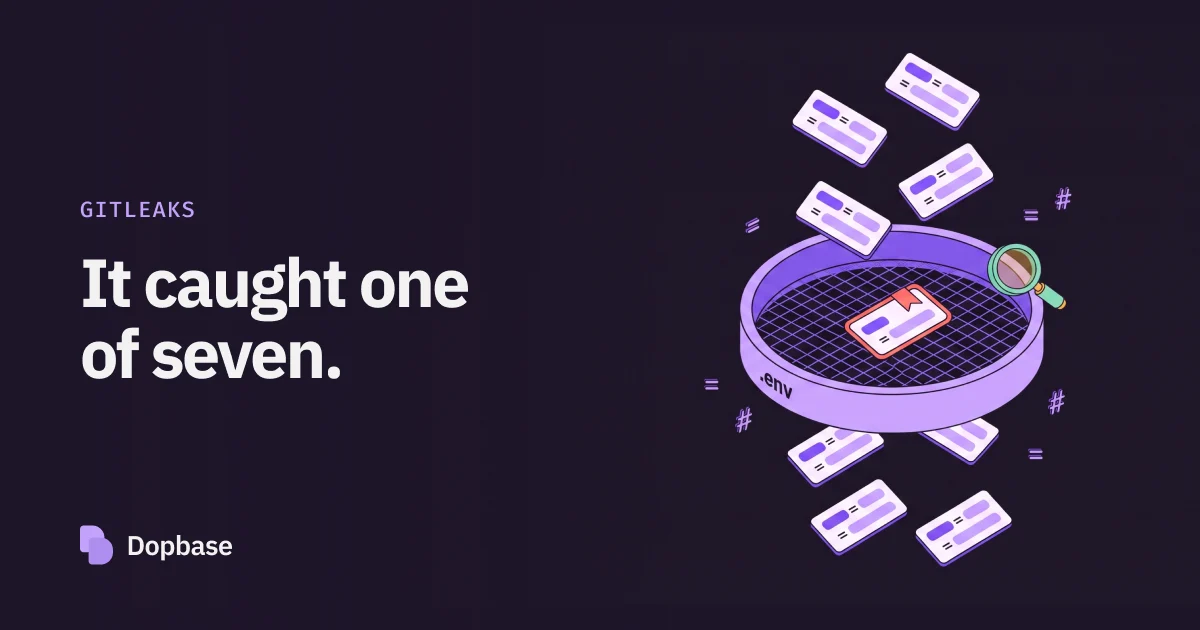
We committed a sample app.env with seven values that look like secrets, and gitleaks reported one. It caught a random token named PAYMENT_TOKEN. It let through the same token renamed PAYMENT_REF, a DATABASE_URL with a random 16-character password inside, and SMTP_PASS. We ran it twice and got the same single finding. A clean scan means nothing matched gitleaks’ rules, which is a smaller promise than it sounds.
We ran every command here with gitleaks 8.30.1 (the latest release, from 21 March 2026), pre-commit 4.7.0 and git 2.39.5 in a Debian 12 container on 22 November 2026, with sample values only. The post covers the scan modes, what the default rules catch, the .env case, the pre-commit hook and how to ignore a finding. The commands are for macOS and Linux, and we ran them on Linux. We didn’t test the GitHub Action, Windows, Betterleaks or TruffleHog.
Contents
- What gitleaks scans: git, dir and stdin
- Install gitleaks and run a first scan
- Gitleaks is feature complete. What that means
- What gitleaks catches, and what it lets through
- An ignored .env never reaches gitleaks git
- Block a commit with the pre-commit hook
- Ignore a false positive
- Gitleaks in CI
- Keep the .env out of the folder with Dopbase
- Run the test yourself
- Questions
- Conclusion
What gitleaks scans: git, dir and stdin
Each scan mode reads something different, and that decides what a clean result means.
| Command | What it reads | Use it for |
|---|---|---|
gitleaks git |
Every commit in the repo, through git log -p |
History, CI |
gitleaks git --pre-commit --staged |
Changes you have staged and not yet committed | The pre-commit hook |
gitleaks dir |
Files on disk, including ones .gitignore hides |
A working folder, a .env |
gitleaks stdin |
Whatever you pipe into it | Logs and command output |
Older guides use gitleaks detect and gitleaks protect. The gitleaks README says v8.19.0 deprecated both, and gitleaks --help on 8.30.1 no longer lists them. gitleaks detect --source . still ran for us and found the same leak without a warning, so an old script won’t tell you it uses a hidden command.
Install gitleaks and run a first scan
On macOS (the README also lists Docker, Go and prebuilt binaries):
brew install gitleaks
gitleaks version
We used the Linux archive from the releases page, checked against its checksum file. Then, inside a repo:
gitleaks git -vOur test repo had one commit with a token in config.js. Gitleaks printed this, trimmed here:
Finding:     const PAYMENT_TOKEN = "REDACTED"
Secret:      REDACTED
RuleID:      generic-api-key
Entropy:     5.000000
File:        config.js
Line:        2
Commit:      03bc15d3cde0bdc13bb3df1f57725f80668236cb
Fingerprint: 03bc15d3cde0bdc13bb3df1f57725f80668236cb:config.js:generic-api-key:2

INF 1 commits scanned.
WRN leaks found: 1
That’s the --redact run. Without the flag, the Finding and Secret lines print the value in full. If an AI coding agent runs the scan for you, the value lands in its conversation. I’d put --redact on every scan that isn’t for your eyes only.
The README lists exit code 0 for no leaks, 1 for “leaks or error encountered” and 126 for an unknown flag. A 1 can be a crash, so read the output before you go looking for a key.
Gitleaks is feature complete. What that means
In May 2026 the author added a note to the top of the README. Gitleaks is feature complete, and “Future releases will be security patches only.” The author’s focus has moved to Betterleaks, whose README says it is maintained by the people who made gitleaks. The last gitleaks release, 8.30.1, came out on 21 March 2026.
Everything in this post worked on that release, and gitleaks is still MIT licensed. New rules will probably land in Betterleaks, which we didn’t test.
What gitleaks catches, and what it lets through
Gitleaks has two kinds of rules. Provider rules such as aws-access-token match a key’s own format. The catch-all rule, generic-api-key, looks at the name instead. In the 8.30.1 config the name needs a word such as token, secret, key, password or passwd. The value needs 10 to 150 characters and enough randomness (Shannon entropy of 3.5 or more).
We committed these lines, scanned with gitleaks git twice, and split two of them into a second repo to see which half of the rule they failed.
| Line | Caught? | Why |
|---|---|---|
PAYMENT_TOKEN=q8Zr4LmX2vTn9KbW7cYp3HsJ6dFg1Ra5 |
Yes | TOKEN in the name, random value |
PAYMENT_REF=q8Zr4LmX2vTn9KbW7cYp3HsJ6dFg1Ra5 |
No | Same value, no keyword in the name |
DB_PASSWORD=Xk29vLq7WmT4pRz8 |
Yes | Keyword and a random value |
DB_PASSWORD=hunter22hunter |
No | Keyword, but too little entropy |
SMTP_PASSWORD=Nw7Kp2Qx9Lm4Zr8T |
Yes | Keyword and a random value |
SMTP_PASS=Nw7Kp2Qx9Lm4Zr8T |
No | PASS isn’t on the keyword list |
DATABASE_URL=postgres://app:Xk29vLq7WmT4pRz8@db... |
No | The password that was caught above, inside a URL |
SESSION_TOKEN=abc123 |
No | Shorter than 10 characters |
AWS_ACCESS_KEY_ID=AKIAIOSFODNN7EXAMPLE |
No | The AWS rule skips keys that end in EXAMPLE |
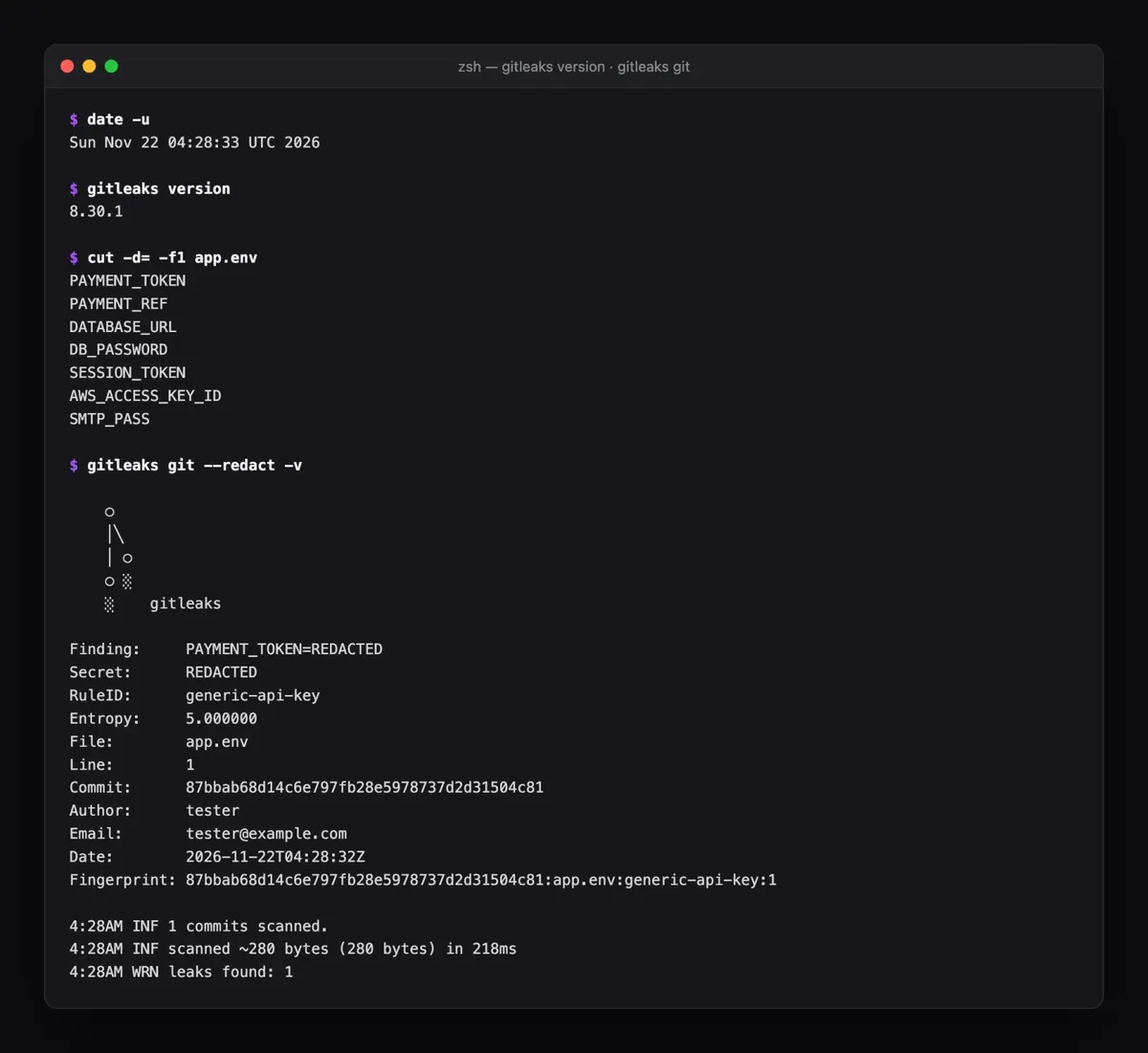
The DATABASE_URL row is the one I’d worry about. The password gitleaks caught under DB_PASSWORD went straight through once it sat between app: and @, and a database URL with a password is a common line in a .env file. A clean scan of that file only means nothing matched.
An ignored .env never reaches gitleaks git
The common case is a .env file listed in .gitignore, never committed, sitting in the project folder. git status --ignored showed ours as !! .env, and we scanned the folder both ways.
The .env file is… |
gitleaks git |
gitleaks dir |
|---|---|---|
| Ignored, never committed | no leaks found, exit 0 |
Found, exit 1 |
| Committed, then deleted | Found in the old commit | no leaks found |
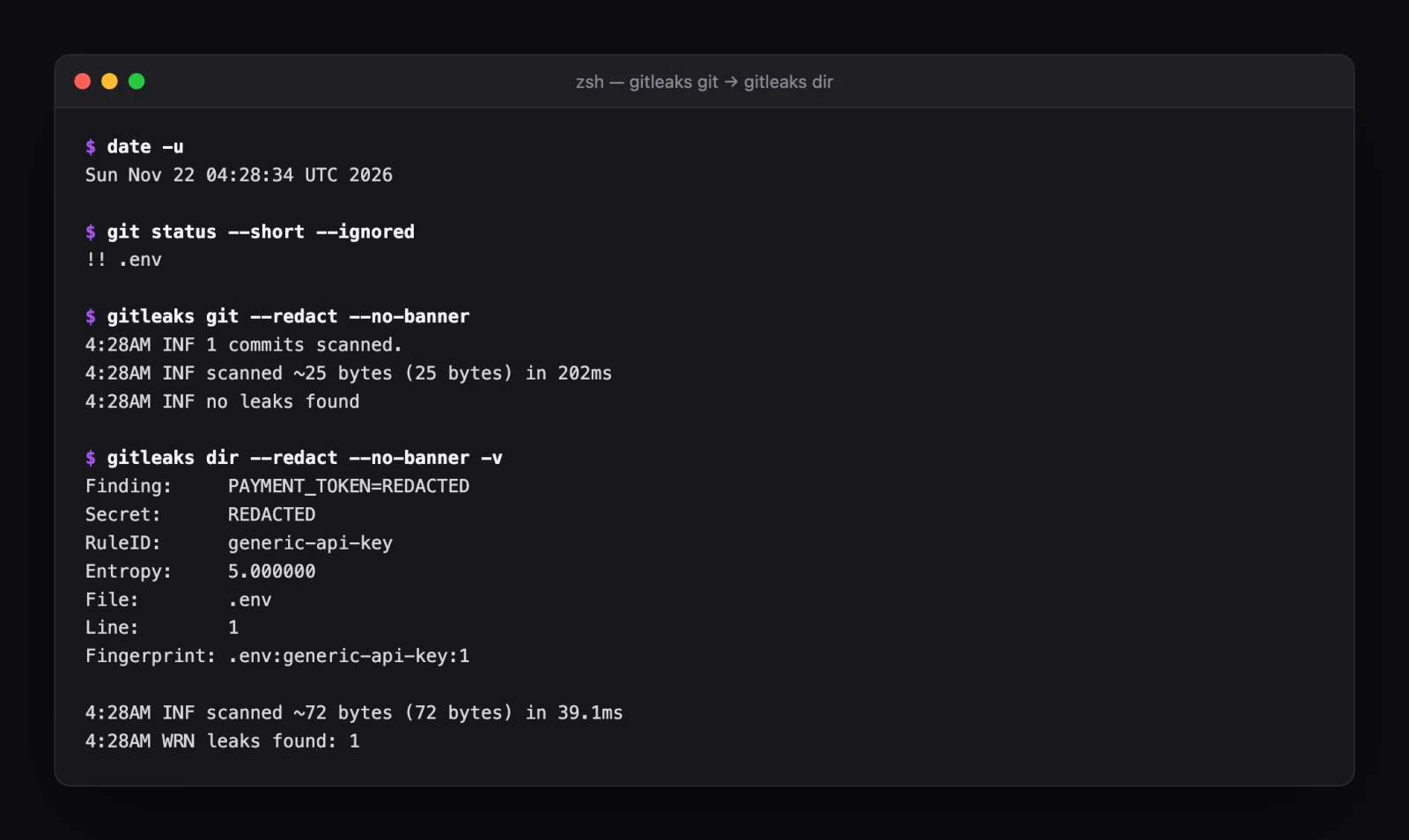
Read the first row quickly and no leaks found sounds like the project is clean. It means the history is clean. The .env is still on disk, and Claude Code, Codex or Cursor can read it like any other file in the folder. I’d run gitleaks dir on the folder an agent works in, and not only gitleaks git on the repo.
The second row is the reverse: the folder looks clean, and the key is still in history. If that’s your case, revoke the key before you clean the history.
Block a commit with the pre-commit hook
The gitleaks repo ships a hook for the pre-commit framework that runs gitleaks git --pre-commit --redact --staged --verbose. Add this as .pre-commit-config.yaml in the repo root:
repos:
  - repo: https://github.com/gitleaks/gitleaks
    rev: v8.30.1
    hooks:
      - id: gitleaks
Then install it:
pip install pre-commit
pre-commit install
The README’s example pins rev: v8.24.2, six releases back, so use the current tag or run pre-commit autoupdate. Pre-commit builds gitleaks with Go the first time, which took two minutes in our emulated container.
We staged a file with a token and committed:
Detect hardcoded secrets.................................................Failed
- hook id: gitleaks
- exit code: 1

Finding:     const PAYMENT_TOKEN = "REDACTED"
RuleID:      generic-api-key
File:        pay.js
Fingerprint: pay.js:generic-api-key:1

INF 0 commits scanned.
WRN leaks found: 1
The hook reported 0 commits scanned. and blocked the commit anyway. (It scans staged changes, and those aren’t a commit yet.)
Two things get past it, and both worked in our test: SKIP=gitleaks git commit ... skips this one hook, and git commit --no-verify skips every hook. For a check nobody can skip, run the same scan in CI.
Ignore a false positive
A test fixture or a sample key will trip the scan sooner or later. We tested both ways to let one through:
- Add a
gitleaks:allowcomment on the line. Gitleaks skips that line. - Copy the finding’s
Fingerprintinto a.gitleaksignorefile at the repo root. Gitleaks skips that one finding. The README calls this feature experimental.
const PAYMENT_TOKEN = "q8Zr4LmX2vTn9KbW7cYp3HsJ6dFg1Ra5"; // gitleaks:allowc300edcd89a29d37b360ae5fbcc01bdfe460beba:order.js:generic-api-key:1Anyone can type gitleaks:allow, including an agent that wants its commit to pass. In our test --ignore-gitleaks-allow brought the allowed line back with exit code 1. That flag belongs in CI.
For an old repo full of findings, the README describes a baseline (--baseline-path). We didn’t test it.
Gitleaks in CI
A CI step that runs gitleaks git --redact fails the build on a finding, because of the exit code. The separate gitleaks-action needs no key for a personal account and a free license key, requested through a form on gitleaks.io, for an organization. Since v2 it isn’t MIT licensed. We didn’t test the action or a CI run.
Custom rules go in a config file. Gitleaks looks for --config, then GITLEAKS_CONFIG (a path), then GITLEAKS_CONFIG_TOML (the content), then .gitleaks.toml in the scanned folder.
Keep the .env out of the folder with Dopbase
Dopbase is a secrets manager for developers and AI coding agents. It keeps values on a server by project and environment, and dopbase run hands one environment to one command as environment variables. That leaves no .env in the folder for gitleaks dir to find or an agent to read.
Our first try left the file behind. dopbase init shop/development --from .env imported the secret, .env stayed, and gitleaks dir still found it. The import guide says the delete question comes after an interactive import, so we ran plain dopbase init instead:
$ dopbase init
.env found

1 variable detected
1 appears sensitive
0 appear non-sensitive

> Import into Dopbase? Yes
> Project/environment (for example payment-service/local): shop/development
✓ Imported 1 variable into shop/development.
✓ Secrets encrypted.
> Delete .env now? Yes
✓ .env deleted.
Then we scanned the folder again and started a command with the value:
gitleaks dir --redact .
dopbase run shop/development -- sh -c 'echo "PAYMENT_TOKEN has ${#PAYMENT_TOKEN} characters"'
gitleaks dir printed no leaks found with exit code 0, and the command printed PAYMENT_TOKEN has 32 characters (Dopbase v0.2.0, throwaway server in the same container).
Dopbase doesn’t scan code. A token pasted into config.js is still a gitleaks job. An agent started inside dopbase run inherits the values, so start the agent outside it. Code the agent wrote can still print a value when a person runs it with real values.
Run the test yourself
With gitleaks and git installed, paste this into a terminal. It creates a gitleaks-test folder.
mkdir gitleaks-test && cd gitleaks-test && git init -q
cat > app.env <<'EOF'
PAYMENT_TOKEN=q8Zr4LmX2vTn9KbW7cYp3HsJ6dFg1Ra5
PAYMENT_REF=q8Zr4LmX2vTn9KbW7cYp3HsJ6dFg1Ra5
DB_PASSWORD=hunter22hunter
SMTP_PASS=Nw7Kp2Qx9Lm4Zr8T
DATABASE_URL=postgres://app:Xk29vLq7WmT4pRz8@db.internal.example:5432/app
EOF
git add app.env && git commit -qm "add app.env"
gitleaks git --redact -v
echo "exit code: $?"
echo ".env" > .gitignore
echo "PAYMENT_TOKEN=q8Zr4LmX2vTn9KbW7cYp3HsJ6dFg1Ra5" > .env
gitleaks git --redact
gitleaks dir --redact
The first scan reports one leak, line 1 of app.env, with exit code 1. The second reports the same leak and nothing from the uncommitted .env. The third finds two: line 1 of app.env and the token in .env.
Questions
What does gitleaks detect?
Gitleaks detects strings that match its rules: 222 in the 8.30.1 default config, including generic-api-key for values under names like TOKEN or PASSWORD. It doesn’t check whether a key works. A password inside a database URL, or under a name with no keyword, went through in our test.
Is gitleaks still maintained?
Only for security fixes, while the author works on Betterleaks. The README calls it feature complete, and the last release, 8.30.1, came out on 21 March 2026.
Gitleaks vs TruffleHog: which should I use?
TruffleHog if you need to know whether a found key still works. Its README says it classifies over 800 secret types and can log in to check whether a key is live, which gitleaks doesn’t do. TruffleHog is AGPL-3.0 and gitleaks is MIT. We didn’t test TruffleHog.
How do I ignore a line in gitleaks?
Add a gitleaks:allow comment at the end of the line. To ignore one finding without touching the code, put its fingerprint in a .gitleaksignore file in the repo root. --ignore-gitleaks-allow turns the inline comments off again.
Is gitleaks free?
Yes. The CLI is open source under the MIT license. The GitHub Action has its own license and needs a free key from gitleaks.io for repos owned by an organization.
Conclusion
Gitleaks finds keys in Git history with gitleaks git and in a folder with gitleaks dir, and its pre-commit hook blocks a commit that adds one. It catches values whose name or format it knows. In our test it missed a password inside a database URL, and gitleaks git never saw a .env that wasn’t committed.
I’d run three things: the pre-commit hook with --redact, gitleaks git in CI with --ignore-gitleaks-allow, and gitleaks dir on any folder an agent works in. We don’t know yet whether Betterleaks catches the rows gitleaks let through.
gitleaks dir --redact .