How to use AI coding agents to ship code
Take a coding task from issue to pull request with Cursor, Claude Code, or OpenAI Codex. Give the agent a clear brief, review its diff, and verify the fix before merging.
The receipt tests pass locally. In staging, checkout succeeds but the receipt never arrives. You could tell your coding agent to “fix receipts” and wait for a diff. The trouble is that the bug could be in the code, the staging configuration, or the email provider. Until you know which, it’s hard to tell whether the diff fixes anything.
Here’s an AI coding workflow you can use with Cursor, Claude Code, or OpenAI Codex. Give the agent a bug it can investigate and a way to test its work. You decide what it can access, review what it changes, and verify the fix in the environment where the bug happened.
We’ll use a checkout service called storefront as an example and check its staging configuration with Dopbase.
Contents
- Give the agent a clear brief
- Check staging configuration
- Review the diff and tests
- Verify the fix in staging
- Questions
- Conclusion
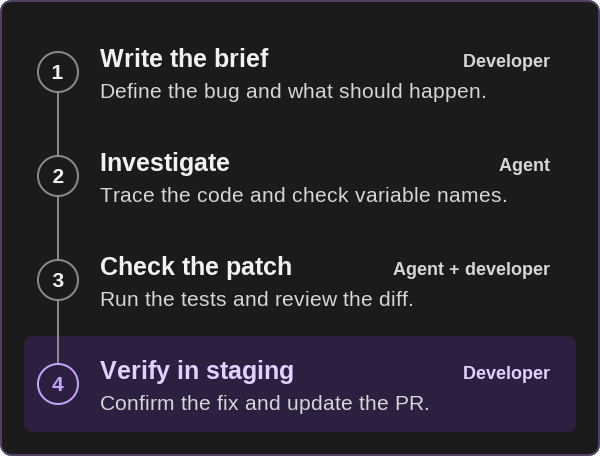
1. Give the agent the bug and a way to prove it’s fixed
A good brief says what you observed, what should happen, and how to check the result. In Cursor, use Agent for the repository investigation. In Claude Code, point it at the failing test or the receipt sender if you already know where to look. The same brief works with OpenAI Codex.
Paste something like this into your agent.
Checkout succeeds in staging, but the receipt email never arrives.

Trace the receipt sender and tell me where it fails. List the environment
variables it reads, then compare those names with storefront/staging.

If the app silently skips receipts when a required setting is missing,
add a test for that case and report the missing setting by name. Use a
fake mail provider in tests. Leave deployment and credential changes to me.
Ask for the diagnosis before edits if the failure could come from several places. A useful first reply points to the code path and shows the evidence. In this example, the receipt sender reads RECEIPTS_API_KEY and returns early if it’s missing. That gives you one specific behavior to review and one configuration name to check.
2. Let the agent check staging configuration
The agent needs to know whether RECEIPTS_API_KEY exists in staging. In Dopbase, you can give it a Names only token scoped to storefront/staging. On your own machine, use a scoped personal token. For a shared bot, use an agent account owned by someone on the team. See what each Dopbase agent access level allows.
Load the token into the agent’s shell through DOPBASE_TOKEN outside the chat. Then ask the agent to list the configured names.
dopbase secret list storefront/staging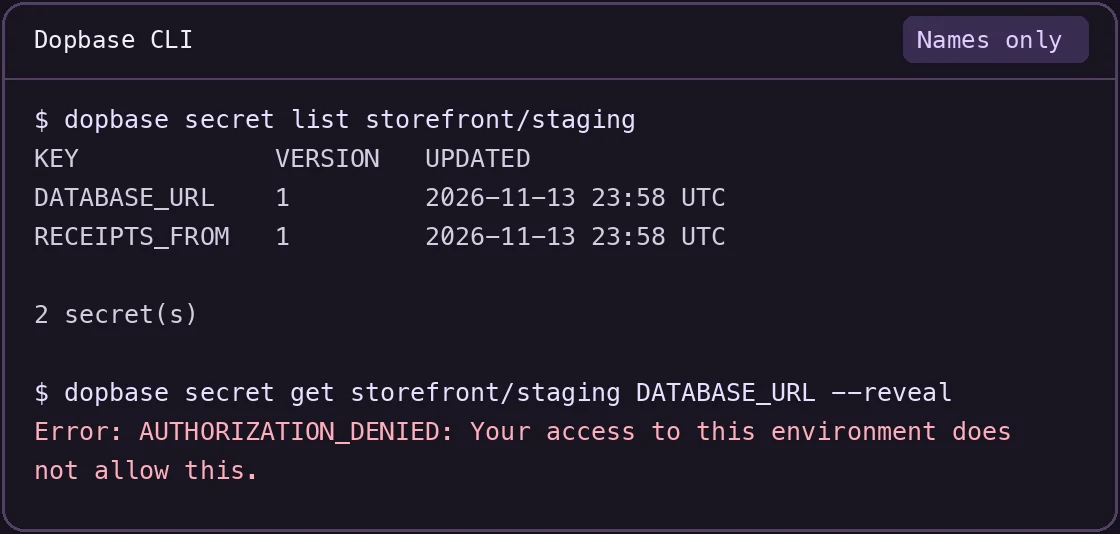
The demo lists DATABASE_URL and RECEIPTS_FROM. The application also expects RECEIPTS_API_KEY, so the developer knows which setting to add. With Names only, the agent can check whether a key is present. Testing whether the email provider accepts its value takes a separate staging check.
The token limits what Dopbase will return. Keep any credential files the agent could read outside its workspace, and start the agent outside any dopbase run command that injects working secrets. Guide to keeping secrets out of an agent’s workspace
3. Review the diff and the test results
Have the agent make the missing setting visible in the app’s logs. In this case, checkout should still succeed. When the receipt sender skips an email, the log should name RECEIPTS_API_KEY so the next developer knows what to check.
Ask the agent to add or update tests for both paths. With no key, the receipt sender logs the missing setting and makes no provider call. With a fake key and a stubbed provider, it still sends a receipt through the expected code path. Have the agent report the exact test command it ran and its result.
Review the diff yourself. Check that the log contains only the variable name, that the tests use fake values, and that the change leaves checkout behavior intact. The agent can draft the PR summary with the cause, the code change, and the tests it ran. Include the staging check in that summary so the next reviewer knows what still needs to happen. If you use Codex for PR reviews, you can record a recurring rule in AGENTS.md, such as checking that configuration errors never print credential values.
4. Verify the fix where the bug happened
Add the staging credential through your normal secrets workflow. Once the reviewed change is running in staging, place a test order and confirm the receipt arrives. Record the result in the PR. A passing unit test shows that the application handles the missing setting as intended. The test order shows that staging can send mail.
Questions
Can I use this workflow without Dopbase?
Yes. Give the agent a checked-in .env.example with empty placeholders so it can compare the names in the code with the names your project expects. If the question is whether a setting exists in staging, check your deployment configuration yourself and share the answer by name.
What if a test needs a real API key?
Let the agent run the unit tests with a fake provider. After you review the diff, run the integration test yourself or use a CI job that supplies a test credential only to that job. Record which checks passed in the PR.
What if the agent changes more than the issue asks for?
Ask it to explain which changes reproduce the bug or fix it. For the receipt issue, a change to checkout or the mail provider needs its own reason. If the diff mixes in unrelated edits, ask for a smaller patch before you review it.
Conclusion
Pick one bug with a symptom you can reproduce. Put the expected behavior and the test the agent can run in the brief. In the receipt example, the agent can show why the sender skips an email and test the code change locally. The developer adds the staging credential and places the test order. Record both results in the PR so the reviewer can see what was verified.