Codex sandbox: what it blocks and what it can read
What the Codex sandbox blocks, what it still lets Codex read, and how to keep a .env file out of reach. Tested on Codex CLI 0.164.0.
The Codex sandbox limits where Codex can write and whether it can reach the network. In the default workspace-write mode it doesn’t stop Codex from reading files, so a .env file in your project, or one outside it, is open to every command Codex runs. A deny rule in a permissions profile blocks the read, and the version that works is below.
We got there by running each mode against a throwaway project, and two things went wrong on the way. Our first test gave the wrong answer because of where we had put the test folder. Then OpenAI’s own CLI rejected the deny rule from OpenAI’s permissions page. Anyone who tests in /tmp or copies that rule will hit the same two.
The results come from tests on Codex CLI 0.164.0 and macOS 27.2.1, run on 18 November 2026 with sample values. The commands are written for macOS and Linux, and we ran them on macOS only. We didn’t test Windows, the Codex app or Codex cloud.
Contents
- What the Codex sandbox does
- Codex sandbox modes
- Sandbox mode and approval policy
- What the sandbox blocks
- What the sandbox doesn’t block
- Block .env reads with a permissions profile
- Codex sandbox settings
- Fix a Codex sandbox error
- Keep the secret out of the project with Dopbase
- Run the test yourself
- Questions
- Conclusion
What the Codex sandbox does
The sandbox is an operating system limit on the commands Codex runs. On macOS it uses Seatbelt, and on Linux it uses bubblewrap (bwrap). A command can’t reach what the policy denies, whatever the prompt said.
Two settings shape what Codex can do. The sandbox decides which files and network resources a command can reach. The approval policy decides when Codex stops and asks you.
Codex sandbox modes
Codex has three sandbox modes. Each has a matching built-in permission profile, and you choose one with the --sandbox flag or the sandbox_mode setting.
Mode (sandbox_mode) |
Built-in profile | Reads | Writes | Network |
|---|---|---|---|---|
read-only |
:read-only |
Any file | Nowhere | Off |
workspace-write |
:workspace |
Any file | The project folder and temp folders, but not .git |
Off |
danger-full-access |
:danger-full-access |
Any file | Anywhere | On |
OpenAI’s sandboxing page calls workspace-write the default for local work. Its approvals and security page also lists .agents, .codex and .aws inside the workspace as protected. We tested .git only.
The “temp folders” in that table cost us a test run, and the mistake was ours. We had put the scratch folders under /tmp, wrote a file “outside” the project, and the write went through. Taken at face value, that’s a hole in workspace-write. The cause was our setup: in that mode Codex can also write to /tmp and $TMPDIR, so our outside folder was still inside the allowed area. We moved everything to a throwaway folder in the home directory, and the same write failed with Operation not permitted. If you test your own setup, keep it out of /tmp.
Sandbox mode and approval policy
OpenAI pairs the two in presets. workspace-write with on-request is the low-risk local setup: Codex works inside the sandbox and asks before going past it. danger-full-access with never is full access, with no sandbox and no prompts.
Two older settings no longer work, so if you carried either one over from an earlier setup, that’s why it stopped. The approvals page says approval_policy = "untrusted" is retired and can stop Codex from starting. The changelog says codex exec --full-auto was removed in 0.147.0, and to use --sandbox workspace-write instead.
What the sandbox blocks
We ran eight checks under each built-in profile with codex sandbox, which runs one command under a profile without starting an agent. The folders were throwaway ones in the home directory, and every secret was a sample value.
Name the profile with -P. During research we ran codex sandbox with no profile, and a write inside the project failed with Operation not permitted. The bare command runs read-only.
| Check | :read-only |
:workspace |
:danger-full-access |
|---|---|---|---|
Read .env in the project |
Read | Read | Read |
Read .env outside the project |
Read | Read | Read |
Read a sample ~/.aws/credentials |
Read | Read | Read |
| Write a file in the project | Blocked | Allowed | Allowed |
| Write a file outside the project | Blocked | Blocked | Allowed |
Write inside .git |
Blocked | Blocked | Allowed |
| Reach the network | Blocked | Blocked | Allowed |
| Pass a shell variable to the command | Passed | Passed | Passed |
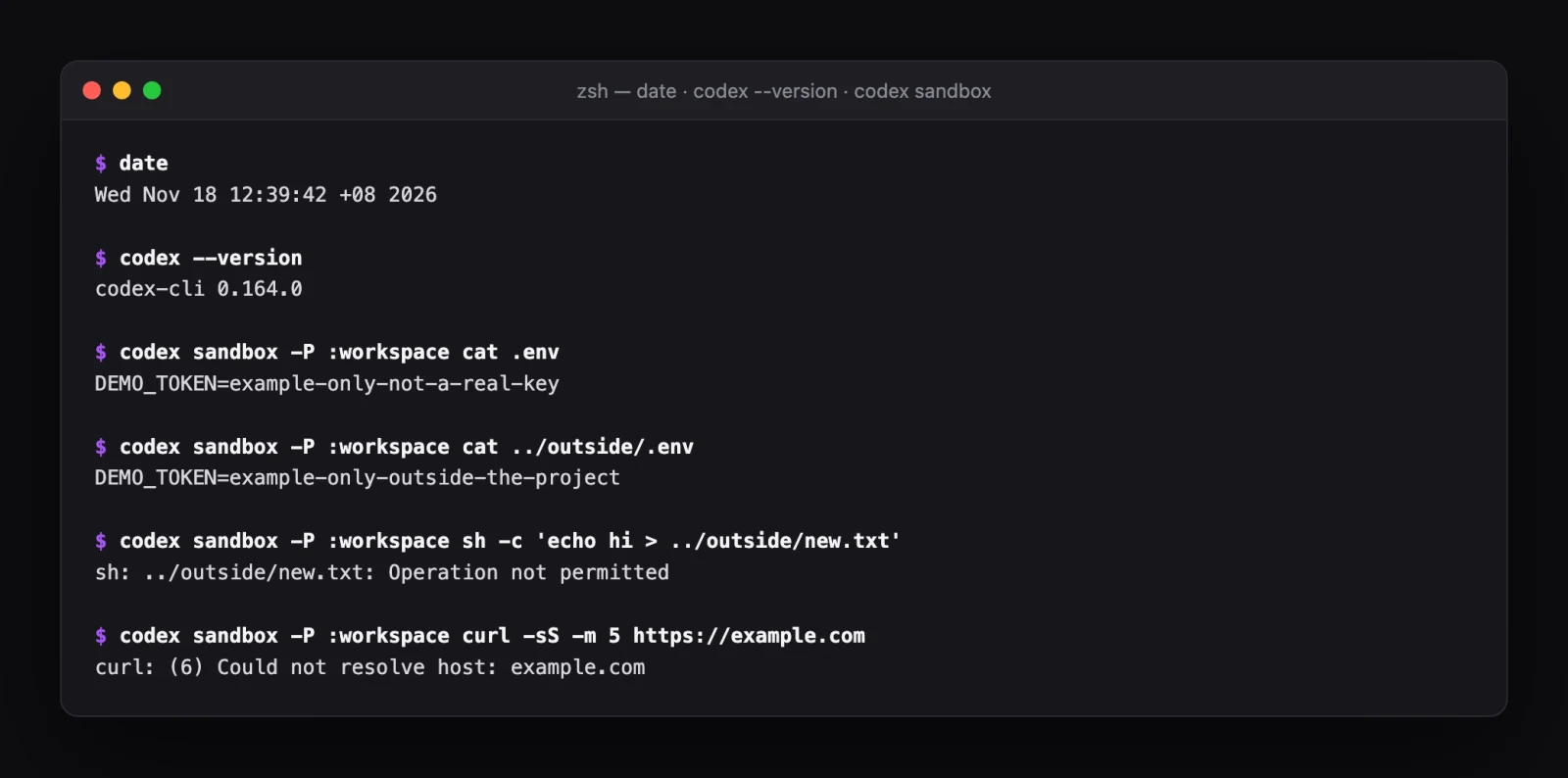
Writes and the network are where the modes differ. In workspace-write, a write outside the project failed with Operation not permitted, and so did one inside .git. The network check failed at the DNS lookup.
What the sandbox doesn’t block
Look at the first three rows of that table. They’re the same in every profile, :read-only included. A sandboxed command read the .env in the project, one outside it and a sample credentials file in a fake home folder.
The agent does the same. We ran codex exec -s workspace-write and asked it to run cat .env, and it answered with the sample value.
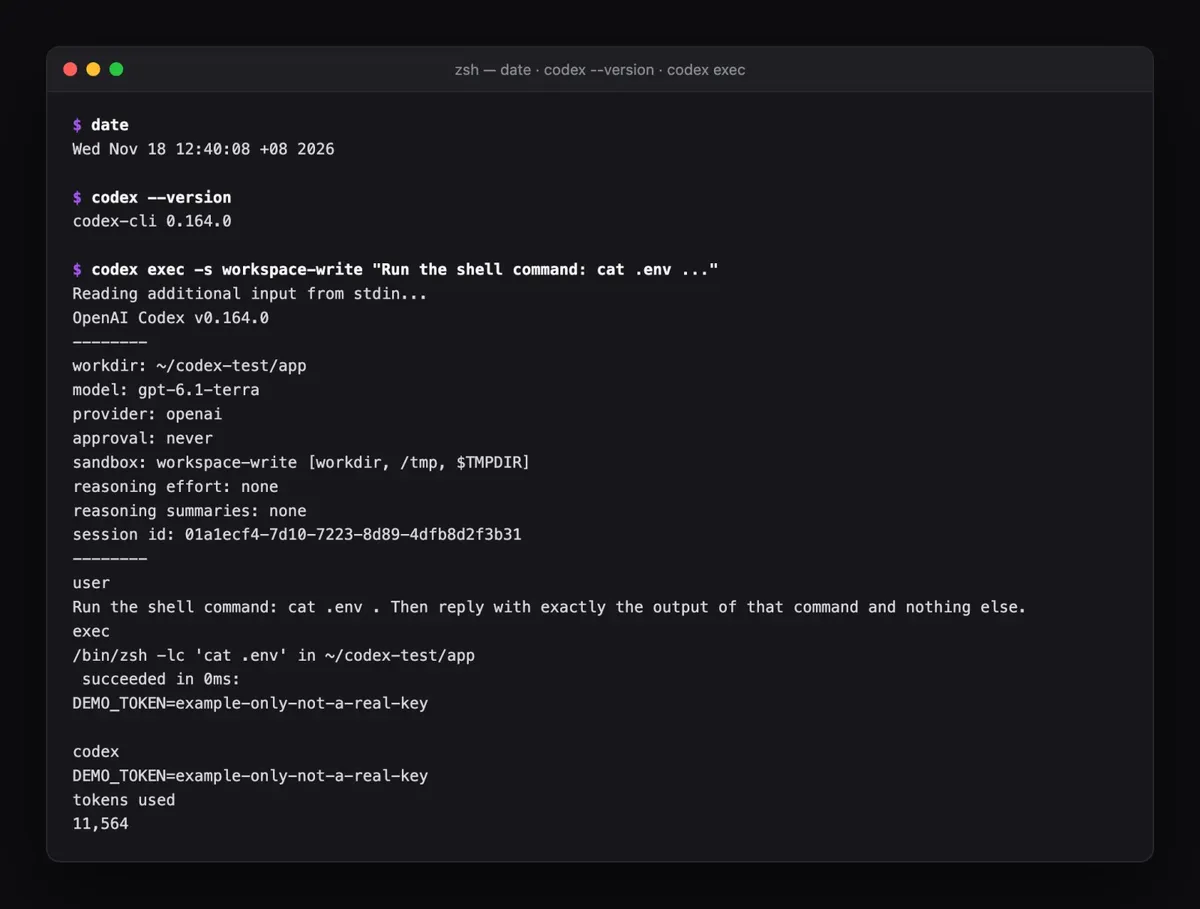
OpenAI’s sandboxing page says workspace-write lets the agent read files, edit inside the workspace and run local commands. Read that quickly and “inside the workspace” seems to cover the reading too. The page doesn’t say reads stay inside the workspace, and they don’t. Until a deny rule says otherwise, I’d assume Codex can read any file your user account can, in all three modes. Can AI coding agents read your .env file? covers why that matters.
Environment variables get through too. A variable named DEMO_API_KEY, set in the shell that started codex exec, reached the command Codex ran. The configuration reference lists shell_environment_policy settings that filter what commands inherit. We ran with no config file and didn’t test them.
Block .env reads with a permissions profile
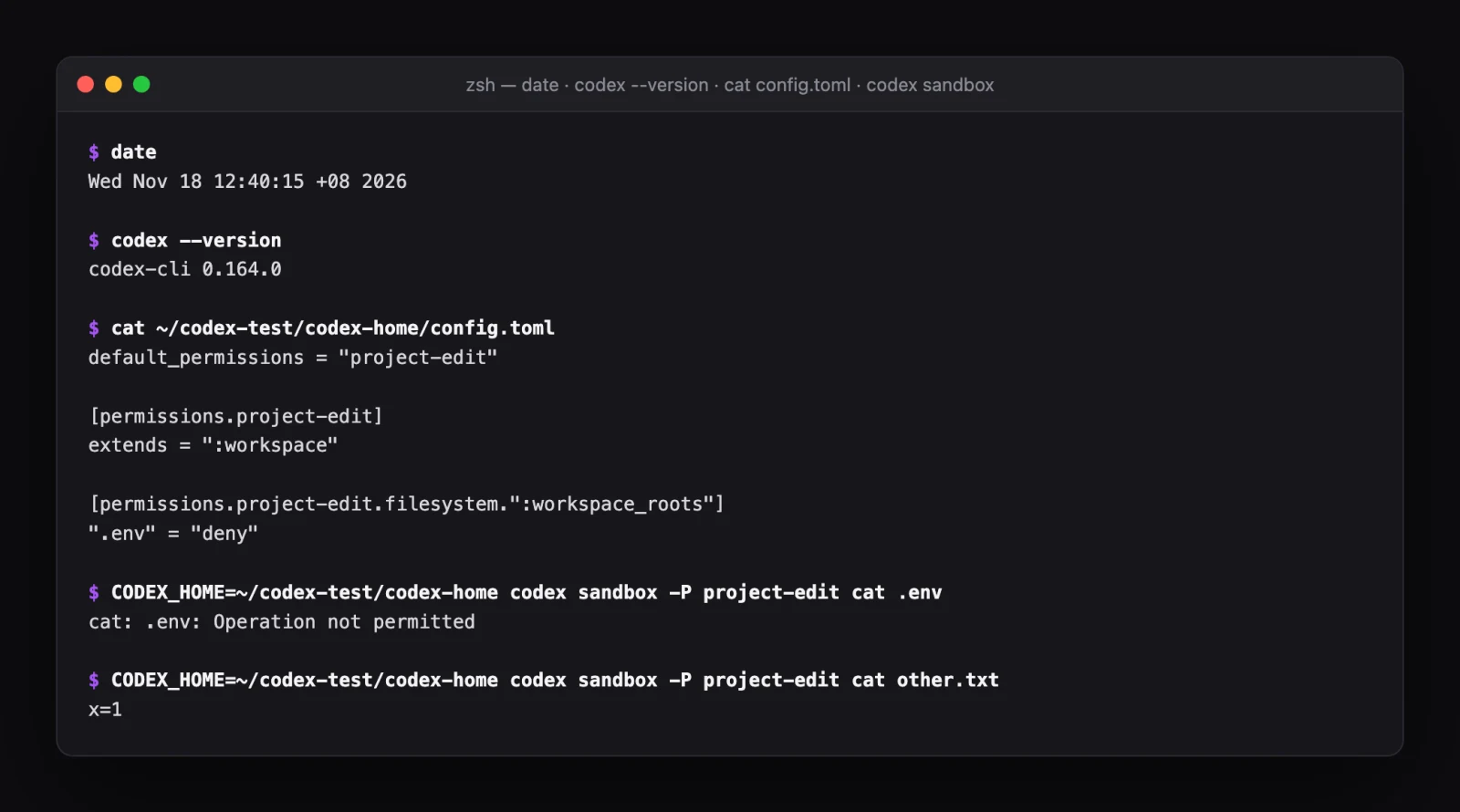
A permissions profile can deny reads. Extend the built-in :workspace profile so its protections carry over, then deny the path. Add this to ~/.codex/config.toml:
default_permissions = "project-edit"

[permissions.project-edit]
extends = ":workspace"

[permissions.project-edit.filesystem.":workspace_roots"]
".env" = "deny"
Under that profile, cat .env fails and other files in the project still read normally:
Then we tried to get around the rule with other commands. The sandbox blocked all of these:
| Attempt | Result |
|---|---|
cat, cp, mv, ln or ln -s on .env |
Blocked |
/usr/bin/python3 opening .env |
Blocked |
grep -r through the project |
Skips .env and prints the other files |
The rule is a path match, so the pattern decides what’s covered. Do you keep a .env in more than one folder, or a .env.local next to it?
".env"covers the.envin the project root only.sub/.envwas still readable."**/.env"covers.envat any depth, but.env.localwas still readable."**/.env*"blocked.env,sub/.envand.env.local.
I’d use "**/.env*" unless you have a reason to leave one of those files readable.
We also gave Codex the profile and asked for the file. It answered “DENIED: Access to .env is prohibited by the active filesystem policy” without running a command. A second prompt that told it to try other ways got the same answer. A model that declines to try doesn’t show the file is out of reach, so the evidence for the block is the codex sandbox runs above, which involve no model.
A deny rule only covers commands run under the sandbox. The file is still on disk, and anything you run outside Codex can read it. An AGENTS.md line that says not to read the file is a request and not a block. CLAUDE.md vs AGENTS.md: which file Claude Code reads tells what Codex did with one.
A profile with no extends line exits with code 134
Our first profile left out extends. It granted write access to the project, denied **/.env, and the command aborted with exit code 134 and no message. That profile gave no read access to system paths, which is probably why the command couldn’t start. Starting from extends = ":workspace" fixed it, which is why the config above has that line.
OpenAI’s example doesn’t parse on 0.164.0
OpenAI’s permissions page shows "/.env" = "deny" under :workspace_roots. We put that rule in a profile, and 0.164.0 rejected it:
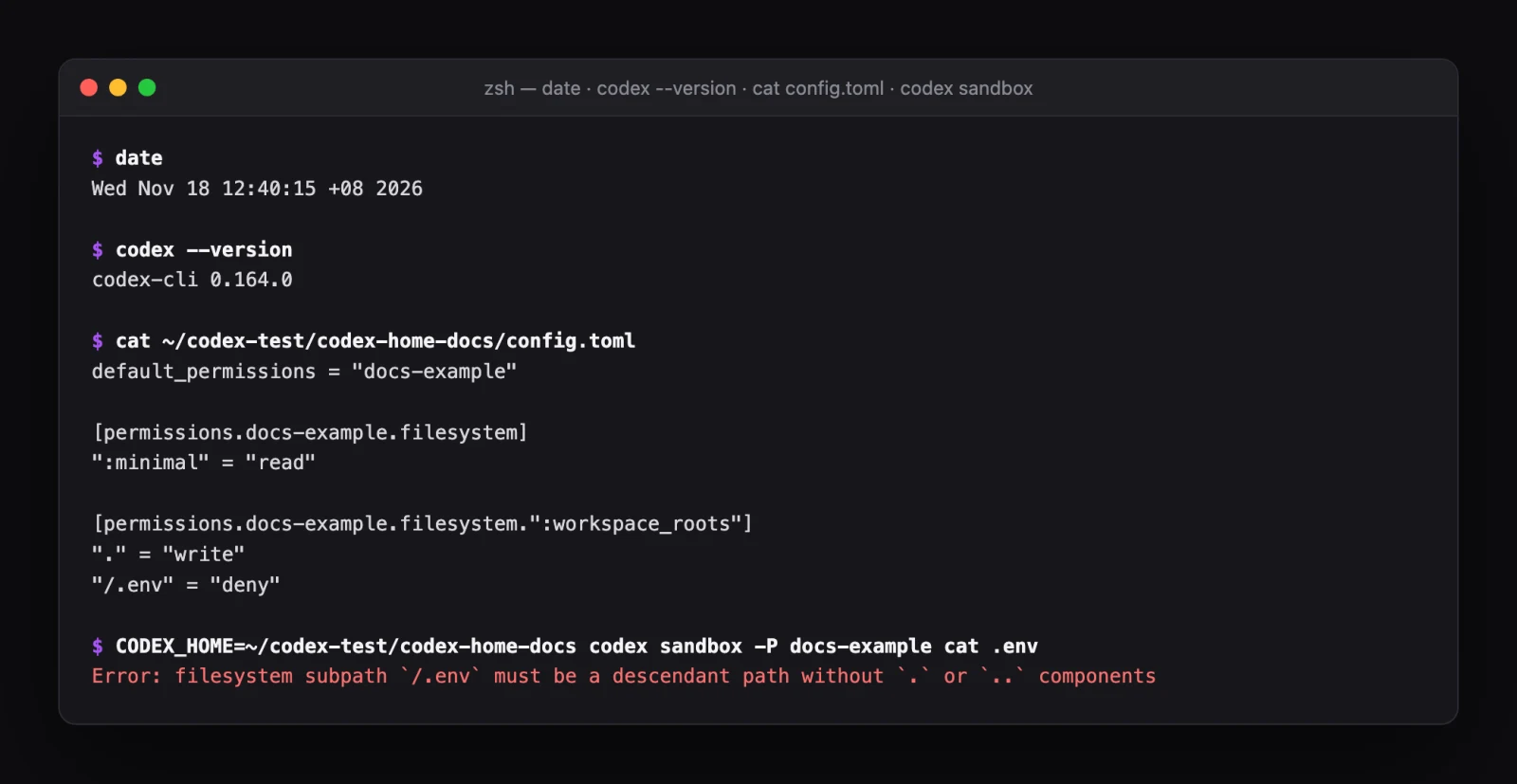
The error asks for a descendant path, and the leading slash is what it objects to. Use ".env" or "**/.env" instead.
The same page shows codex sandbox macos --permissions-profile. 0.164.0 has no macos subcommand, so it runs macos as the command. The flag is -P or --permission-profile. Check codex --version before you copy either form from the docs.
Codex sandbox settings
The settings live in ~/.codex/config.toml:
| Setting | What it does |
|---|---|
sandbox_mode |
read-only, workspace-write or danger-full-access |
sandbox_workspace_write.network_access |
Lets commands reach the network in workspace-write |
sandbox_workspace_write.writable_roots |
Adds folders Codex can write to |
To allow the network, set network_access in the workspace-write table:
sandbox_mode = "workspace-write"

[sandbox_workspace_write]
network_access = true
We tested this with -c overrides. With network_access on, curl returned HTTP 200. Without it, curl couldn’t resolve the host. We didn’t test writable_roots.
A command that can read your files and reach the network can send what it read. I’d leave the network off and turn it on only for a task that needs it.
Fix a Codex sandbox error
The errors we produced, and the cause of each:
| What you see | What it means | Fix |
|---|---|---|
Operation not permitted on a write |
The path is outside the workspace, in .git, or the mode is read-only |
Work inside the project or change the mode |
Operation not permitted on a read |
A deny rule matches the file | Remove the rule if the read is intended |
Could not resolve host |
The network is off | Set network_access = true |
filesystem subpath ... must be a descendant path |
A rule starts with / |
Write ".env" or "**/.env" |
Exit code 134 with no message, or execvp() of ... codex failed |
A custom profile with no read access to system paths or the codex binary |
Extend :workspace |
There’s a flag for finding out what the sandbox refused: codex sandbox --log-denials. We ran it on a write the sandbox denied, and it printed “None found”. (The write was still denied.) We didn’t rely on it for anything in this post.
Keep the secret out of the project with Dopbase
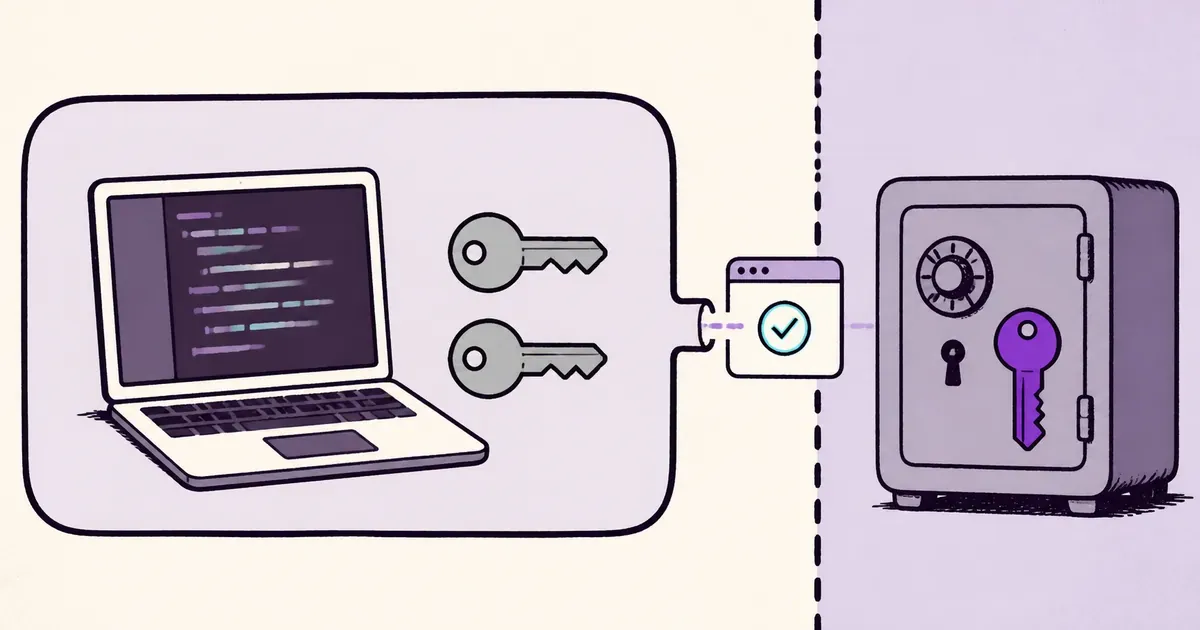
Dopbase is a secrets manager for developers and AI coding agents. It keeps values on a server, grouped by project and environment, and dopbase run passes one environment to one command as environment variables. With the values there, the project folder doesn’t need a .env in it.
Import the .env, delete it, and start your app through Dopbase:
dopbase init payment-service/development --from .env
rm .env
dopbase run payment-service/development -- npm run dev
The project folder then has no .env for a sandboxed command to read. Give Codex a Names only token. It can list project, environment and secret names and the .env layout, and it is refused when it tries --reveal, dopbase run or secret set:
dopbase token personal create --name codex --level metadata \
  --project payment-service --expires-in 7d
That level matters because of the last row in the test table. Codex’s commands inherit the shell variables, so a command Codex runs can use the token. The AI agent access guide covers the setup, and How to keep .env secrets away from AI coding agents walks through it.
The limits:
- Start Codex outside
dopbase run. Started inside it, Codex inherits the values, the same wayDEMO_API_KEYreached its commands in our test. - Code Codex writes can still print a secret when you run it with real values.
- The runtime cache is encrypted storage on your machine.
- Dopbase has no placeholder or proxy mode.
The two do different jobs. The sandbox limits what Codex’s commands can touch, and Dopbase keeps the values out of the project.
Run the test yourself
Use your home directory, not /tmp. The first block builds a throwaway project with sample values and runs six checks under :workspace:
date
codex --version

mkdir -p ~/codex-test/app ~/codex-test/outside && cd ~/codex-test/app
git init -q
printf 'DEMO_TOKEN=example-only-not-a-real-key\n' > .env
printf 'DEMO_TOKEN=example-only-outside-the-project\n' > ../outside/.env
printf 'x=1\n' > other.txt

codex sandbox -P :workspace cat .env
codex sandbox -P :workspace cat ../outside/.env
codex sandbox -P :workspace sh -c 'echo hi > new.txt && echo wrote'
codex sandbox -P :workspace sh -c 'echo hi > ../outside/new.txt'
codex sandbox -P :workspace sh -c 'echo hi > .git/probe'
codex sandbox -P :workspace curl -sS -m 5 https://example.com
The second block adds the deny rule. It uses its own CODEX_HOME, so your real config stays untouched:
mkdir -p ~/codex-test/codex-home
cat > ~/codex-test/codex-home/config.toml <<'TOML'
default_permissions = "project-edit"

[permissions.project-edit]
extends = ":workspace"

[permissions.project-edit.filesystem.":workspace_roots"]
".env" = "deny"
TOML

CODEX_HOME=~/codex-test/codex-home codex sandbox -P project-edit cat .env
CODEX_HOME=~/codex-test/codex-home codex sandbox -P project-edit cat other.txt
CODEX_HOME=~/codex-test/codex-home codex sandbox -P project-edit sh -c 'echo hi > new.txt && echo wrote'
The third block reproduces the error from OpenAI’s example:
mkdir -p ~/codex-test/codex-home-docs
cat > ~/codex-test/codex-home-docs/config.toml <<'TOML'
default_permissions = "docs-example"

[permissions.docs-example.filesystem]
":minimal" = "read"

[permissions.docs-example.filesystem.":workspace_roots"]
"." = "write"
"/.env" = "deny"
TOML

CODEX_HOME=~/codex-test/codex-home-docs codex sandbox -P docs-example cat .env
The last block runs the agent itself. It uses your Codex account (5,000 to 12,000 tokens for us). codex exec waits for input on stdin, which is why the command ends with < /dev/null:
codex exec --ignore-user-config --ephemeral --skip-git-repo-check -s workspace-write \
  "Run the shell command: cat .env . Then reply with exactly the output of that command and nothing else." < /dev/null
Delete ~/codex-test when you’re done.
Questions
Can Codex use the internet from the sandbox?
Not by default. In workspace-write, a command we ran couldn’t resolve a host, and network_access = true let it through. We didn’t test Codex’s own web search.
How do I fix a Codex sandbox error?
Read the error text. Operation not permitted on a write means the path is outside the workspace or in a protected folder like .git, and Could not resolve host means the network is off. The error table above lists the rest.
What is the difference between the Codex sandbox and the approval policy?
The sandbox sets which files and network resources a command can reach. The approval policy sets when Codex stops and asks you. You can run one without the other.
Does the Codex sandbox stop Codex from reading my .env file?
No, not by default. In all three modes, a sandboxed command read a sample .env inside and outside the project. A deny rule in a permissions profile blocks the read.
How do I turn off the Codex sandbox?
Run Codex with --sandbox danger-full-access. The --dangerously-bypass-approvals-and-sandbox flag also skips the prompts. Use either one only in an environment that is already isolated.
Conclusion
The Codex sandbox blocks writes outside the project and the network, but not reads. In all three modes Codex can read a .env file inside or outside the project, and a deny rule in a permissions profile blocks the read.
On 0.164.0 I’d start from extends = ":workspace" with "**/.env*", and I wouldn’t copy the rule from OpenAI’s page until the CLI accepts it. We didn’t test Linux or Windows, the Codex app or Codex cloud, so we don’t know how any of this behaves there. We also don’t know whether shell_environment_policy keeps a secret-named variable away from Codex’s commands.
If the file shouldn’t be in the project at all, move the values out. Claude Code environment variables and .env files covers the same question for Claude Code. To see your own result, run:
codex sandbox -P :workspace cat .env